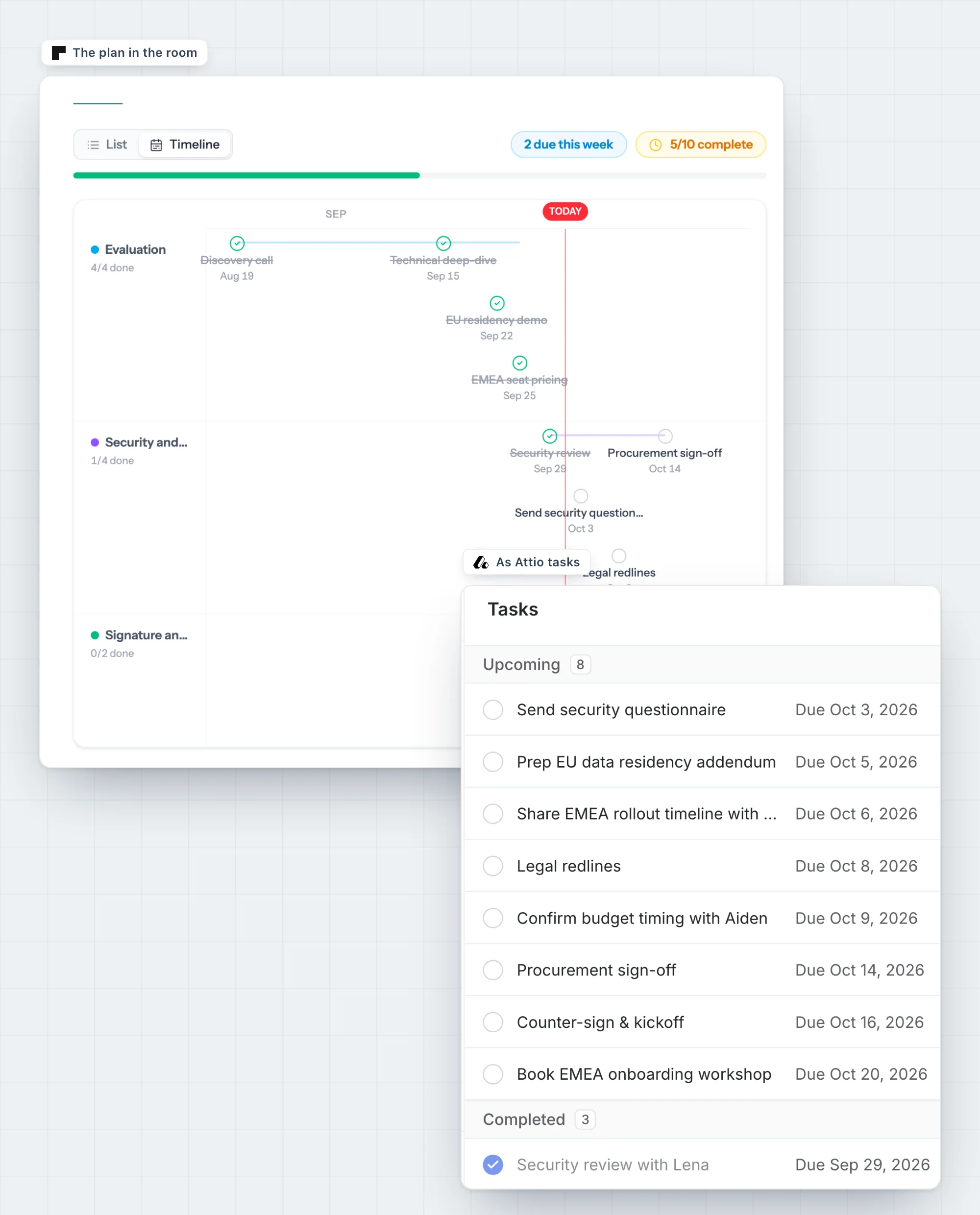
A mutual action plan template with steps for both sides.
A mutual action plan (MAP) is one shared, dated list of every step both sides take between today and a signed contract, with a named owner on each step. This template has six phases and 18 steps that fit many B2B deals. Copy it, cut what you don't need, and send it after your first real call.
Updated
Goal: [What the buyer wants to be true, and by when. Example: renewal team live before the Q1 push.]
Target signature date: [Date] · Go-live: [Date]
| # | Step | Side | Owner | Target date | Status |
|---|---|---|---|---|---|
| 1 · Discovery and alignment | |||||
| 1 | Discovery call: goals, current process, what "done" looks like | Both | [Champion], [AE] | [Date] | Done |
| 2 | Recap and draft business case shared in writing | Seller | [AE] | [Date] | Not started |
| 3 | Success criteria and decision process confirmed (who signs, who can block) | Buyer | [Champion] | [Date] | Not started |
| 2 · Evaluation | |||||
| 4 | Tailored demo for the wider team | Seller | [AE], [SE] | [Date] | Not started |
| 5 | Technical deep-dive: integrations, data, admin | Both | [Technical lead], [SE] | [Date] | Not started |
| 6 | Trial or pilot reviewed against the success criteria (if you run one) | Buyer | [Champion] | [Date] | Not started |
| 3 · Business case | |||||
| 7 | Business case reviewed with the economic buyer | Both | [Economic buyer], [AE] | [Date] | Not started |
| 8 | Budget confirmed and owner named | Buyer | [Economic buyer] | [Date] | Not started |
| 4 · Security and legal | |||||
| 9 | Security questionnaire and documents sent | Seller | [AE] | [Date] | Not started |
| 10 | Security review complete | Buyer | [Security lead] | [Date] | Not started |
| 11 | Contract, DPA and redlines agreed | Both | [Legal], [AE] | [Date] | Not started |
| 5 · Commercials and procurement | |||||
| 12 | Proposal and pricing shared | Seller | [AE] | [Date] | Not started |
| 13 | Pricing approved internally | Buyer | [Economic buyer] | [Date] | Not started |
| 14 | Vendor onboarding and procurement sign-off | Buyer | [Procurement] | [Date] | Not started |
| 6 · Signature and kickoff | |||||
| 15 | Contract signed | Both | [Signer], [AE] | [Date] | Not started |
| 16 | Kickoff call booked, onboarding owner introduced | Seller | [AE], [CSM] | [Date] | Not started |
| 17 | Accounts, access and data set up | Both | [Admin], [CSM] | [Date] | Not started |
| 18 | Go-live and first success check | Both | [Champion], [CSM] | [Date] | Not started |
Send the plan early and review it on every call.
Draft it after the first real call
Fill in only what you heard: the buyer's goal, the date they're working toward, and the people they named. Send it the same day if you can, while the call is fresh for both sides.
Cut the steps that don't apply
A 10-seat deal doesn't need a procurement phase. Deleting steps is part of the conversation: asking "Does your team need a security review for this?" tells you a lot about their process.
Give the buyer's team their own steps
A plan where every step belongs to the seller is just your to-do list. The buyer's own steps (budget owner named, security review done) show you whether their side is doing the work.
Work backward from the buyer's target date
Start from the go-live the buyer cares about and count back. If the dates don't fit, you find out in week one.
Open it at the start of every meeting
Spend two minutes on what's done and what slipped. When a step slips twice, discuss it with the buyer.
Three common reasons a plan stops being used.
- They live in an attachment. A spreadsheet in email goes out of date after the first reply. Nobody knows which version is current.
- Only the seller updates them. If the buyer never ticks a box, the plan only shows your side of the deal.
- They never reach the CRM. Your forecast says "commit" while the plan quietly shows the security review hasn't started.
What fixes all three: a plan that lives at one link the whole buying committee can open, that buyers can tick off themselves, and whose tasks show up on the deal in your CRM. That's what a digital sales room is for. Read the full guide to mutual action plans.
Run the same plan in a room instead of a spreadsheet.
In foyai, the action plan is part of every room. Start from one of five plan templates (standard sale, enterprise close, pilot, onboarding, renewal), and the AI suggests next steps from your call recordings for you to approve. Buyers open it in the room, tick off their own steps and add new ones.
Steps you add become Attio tasks on the deal, and steps suggested from calls sync once you keep them. When a teammate completes it in Attio, the room updates. The deal record carries the plan's completion percentage, so your pipeline review shows how far each plan has got.