How foyai handles your Attio data and buyer rooms.
foyai is a digital sales room built for Attio. It reads the deals, companies, people, notes, and call recordings it needs to draft buyer rooms, and writes back only its own fields, notes, tasks, and buyer contacts. Your content is not used to train AI models, connection tokens are encrypted at rest with AES-256-GCM, and an Attio admin can remove access at any time from Workspace settings → Apps.
Updated
What foyai can access in Attio, and why
An Attio workspace admin approves foyai once for the whole workspace, when your team first signs in with Attio. Each permission maps to something you'll see in the product:
| Access | Why foyai needs it |
|---|---|
| Deals, companies, and people (read and write) | To draft each room from the deal it belongs to, write the Foyai fields back to the deal and company, and add identified buyers as People. |
| Workspace objects and fields (read and write) | To add the Foyai fields to deals and companies, and to create the Foyai rooms table in your sidebar. |
| Notes (read and write) | To read call notes when drafting a room, and to write a Foyai room activity note for each buyer visit. |
| Tasks (read and write) | To create action-plan steps as Attio tasks, and keep their deadlines and completion in sync. |
| Workspace members (read only) | To match your Attio teammates to their foyai accounts. It can't add, remove or change members. |
| Change notifications (read and write) | So foyai is told when a deal, company, note, task or call recording changes in Attio. |
| Meetings and call recordings (read only) | To read call transcripts and draft the room from what the buyer said on those calls. |
The exact permission names are in the docs: Attio permissions reference. Everything foyai writes back is listed field by field in What foyai writes to Attio.
What it adds, and what it leaves alone
- Adds: its own Foyai fields on deals and companies, the Foyai rooms table, a room activity note per buyer visit, tasks your team chooses to send from an action plan, and People for buyers who identify themselves in a room.
- Leaves alone: your existing fields and your own Attio tasks, which it doesn't import. A buyer is only attached to a company when their email domain is on the room's allowed list and they verified their address, and foyai doesn't move an existing contact to a different company.
- Your choice: if test rooms or open-link rooms add People you don't want, turn off "Sync visitors on unlinked rooms" in foyai's Attio settings.
Other connections
- Google Drive, Slides and Docs: connected per person with a Google Workspace account. foyai only accesses files you pick; connecting doesn't let it browse your Drive.
- Slack: sends direct messages to sellers about their own rooms, and looks teammates up by email so each alert reaches the right person.
- Call recorders: Fathom, Fireflies.ai, Avoma, tl;dv, Grain and Granola connect with an API key you create in that tool. foyai stores each call's title, date, and participants, and fetches the transcript when it drafts a room. It keeps a transcript only when you upload one or add a Meeting Notes section to a room, which shows buyers that call's summary and full transcript. Calls with only your own team on them are ignored.
How buyer rooms are protected
A buyer room can hold call recaps, pricing, case studies and an action plan. These are the controls over who can see it.
- Long, random links. Every room lives at a long, random link on foyai's rooms domain or your own custom domain. Before access is granted, visitors see a neutral screen with no company names on it, so a forwarded link doesn't reveal who's talking to whom.
- Excluded from search indexing. Buyer pages tell search engines not to index them.
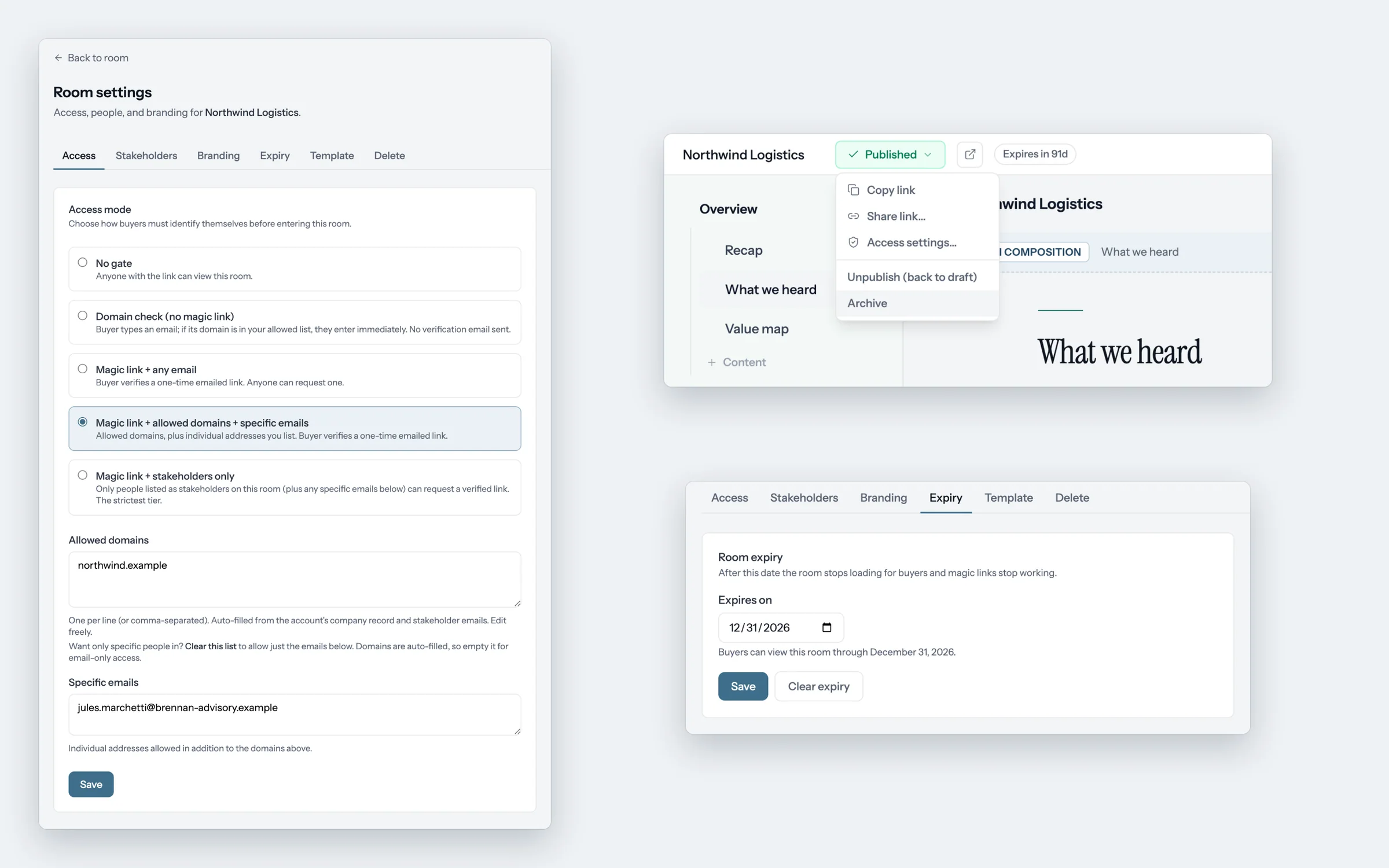
- Access modes you choose per room: an open link; an email domain check, where the buyer types an address at an allowed domain without confirming it; a verified email by magic link; allowed domains and listed emails only; or the room's stakeholders only.
- Single-use email links with a confirmation screen. Verification links work once and expire after 15 minutes. They open a "Continue to room" screen first, and the link is only used up when someone clicks Continue, so an email security scanner that just opens the link doesn't spend it before the buyer does.
- Expiry dates and unpublishing. Give a room an expiry date, or unpublish or archive it at any time. Buyers then lose access; archived and expired rooms show a plain not-found page.
- Drafts stay private. Buyers see only the last version you published. Edits in progress stay with your team.
- Google Drive files are shared person by person. When you add a private Drive file to a room, foyai shares it with the stakeholders you pick, and in rooms with an email domain check, with buyers who pass it. Removing a stakeholder removes their access. When you archive a room, removing Drive access is selected by default; when you unpublish, it's an option you tick. An expiry date doesn't change Drive access, and files shared by link, library files, and deck copies aren't changed.
- No buyer accounts. Buyers don't create an account or password with foyai, so there are no buyer passwords for us to store.
More detail: Room access and The buyer experience.
Your data and AI
Your content is not used to train AI models. foyai uses one AI provider, Anthropic, through its commercial API.
Claude drafts rooms, summarizes calls for Meeting Notes, suggests updates after new calls, fills in personalized decks, and pulls case studies from your website into your library. To draft a room, foyai sends the call transcripts it's working from (which include attendee names and emails), Attio notes on the deal, deal and company details, and the library content that might fit.
Every draft and suggestion waits for a seller to review it, and nothing reaches a buyer until they publish.
Where your data lives
- App and rooms: hosted on Vercel. The app's servers run in Vercel's US East region (Washington, DC).
- Database: Postgres, hosted by Neon.
- Uploaded files: PDFs, images, logos, and headshots you upload are stored with Vercel Blob at long, unguessable links that work without the room's access check. For a file that should open only for buyers you've let in, add it from Google Drive instead of uploading it.
Encryption
Connection tokens for Attio, Google, and Slack, webhook secrets, and the API keys for your call recorders are encrypted in our database with AES-256-GCM. Rooms and the app are served over HTTPS, including rooms on your own custom domain, where the certificate is issued automatically.
Subprocessors
These companies process data on foyai's behalf to run the service:
| Company | Purpose |
|---|---|
| Vercel | Hosting (app servers in US East) and file storage |
| Neon | Database |
| Anthropic | AI drafting (Claude, through the commercial API) |
| Resend | Email, such as buyer sign-in links and room notifications |
| Sentry | Error monitoring for the app and buyer rooms |
| PostHog | Product analytics in the app |
| Stripe | Billing |
| SparrowDesk | Support email |
| Intercom | The chat on foyai.com, including Fin, its AI agent |
| Apollo.io | Which companies visit foyai.com, following the visitor's cookie choice |
When you connect them, data also flows to and from the tools you choose: Attio, Google, Slack, and your call recorder.
Some features look up public information without any of your data: link previews, page text, and company logos come from Microlink, Jina Reader, and logo.dev, using only the public link or domain. The app and rooms load web fonts from Google, and seller profile pictures from Gravatar.
How long data is kept
- Rooms, visit history, and analytics are kept until you delete the room or your workspace. There's no automatic expiry.
- Call transcripts are read from Attio or your call recorder when foyai drafts, and aren't kept, except in Meeting Notes sections and transcripts you upload.
- Calls that never matched a room are removed after 90 days.
- Background job records are removed after 30 days.
Revoking access and deleting your data
- Remove foyai from Attio. In Attio, go to Workspace settings → Apps and remove foyai. It can no longer read or write your workspace.
- Disconnect other tools. In foyai, go to Settings → Integrations to disconnect Slack, Google Drive, or a call recorder.
- Ask us to delete your data. Email support@foyai.com from your work address to request deletion of your workspace's data. For privacy requests, use the contact details in our privacy policy.
Anything foyai already wrote to Attio, such as fields, notes, tasks, and People, is ordinary Attio data and stays in your workspace until you remove it. To remove a single room, delete it in foyai: that removes its plan, stakeholders, visit history, and analytics, removes Google Drive shares made through the room, deletes its personalized deck copies, removes it from the Foyai rooms table in Attio, and offers to delete the tasks it synced. Deleting your workspace removes it from foyai's database and cancels billing; data in your Attio and shares in your Google Drive stay where they are until you remove them.
Compliance status
foyai is a young company and has not completed a SOC 2 audit. These are the controls we have in place today:
- Access to Attio is limited to the permissions listed above, approved by your admin, who can remove it at any time.
- Connection tokens and API keys are encrypted at rest with AES-256-GCM.
- Your content is not used to train AI models.
- Buyer rooms use long, random links, tell search engines not to index them, and can require a verified email.
- Our subprocessors are listed on this page.
We haven't commissioned a third-party penetration test yet, and we don't offer single sign-on or an audit log today. When that changes, this page will say so.
Security questionnaire? Email support@foyai.com and we'll work through it with you.
Once your Attio admin has reviewed these permissions, connect Attio and draft your first room.
Start free with Attio