Newfoyai now builds each buyer their own deck from your Google Slides template.A deck for every buyer.

See how it worksSee how
Product · Mutual action plans

Agree the steps to a decision with your buyer in one dated plan.

A mutual action plan in foyai is the list of dated steps both teams agree to on the way to a decision, kept inside the buyer's room. You start it from one of five templates or from steps suggested on your calls, and you choose which suggestions stay. Buyers tick off their own steps and add new ones, and the steps you add become tasks in Attio.

Updated

Five plan templates

Start from a plan template that fits the deal.

Each template comes with phases, named steps and an owner side for every step. Enter the date the plan works toward, and each step gets a due date.

Counts back from go-live

Standard sales plan

A trial-led path for mid-market deals: discovery, a hands-on trial, agreement, then onboarding.
  1. Discovery2
  2. Trial4
  3. Agreement3
  4. Onboarding1
10 steps
Counts back from go-live

Enterprise close plan

For a larger buyer, with security, legal, procurement and executive sign-off as named steps.
  1. Alignment2
  2. Evaluation2
  3. Business case2
  4. Security, legal, and procurement4
  5. Decision1
  6. Kickoff1
12 steps
Runs forward from kickoff

Pilot / proof of concept

A time-boxed pilot with measurable success criteria agreed up front and a go/no-go at the end.
  1. Scope2
  2. Setup3
  3. Run2
  4. Evaluate and decide2
9 steps
Runs forward from kickoff

Customer onboarding

From kickoff to go-live and a 30-day adoption review, with an owner on each step.
  1. Kickoff2
  2. Setup and integration2
  3. Training2
  4. Rollout and go-live2
  5. Success review1
9 steps
Counts back from renewal

Renewal / expansion plan

A value review, the proposal, budget and procurement, signature, and the next success plan.
  1. Health review2
  2. Proposal2
  3. Approval3
  4. Renewal2
9 steps

Phases and the number of steps in each. Swipe to see all five.

Pick the plan, enter one date

Choose a template when you add the action plan to a room. Enter the target go-live, kickoff or renewal date and every step is dated from it: sales and renewal plans count back from the date, and pilot and onboarding plans run forward from kickoff.

Built a plan you want to reuse? Save the room as a room template and the plan comes with it. Prefer a spreadsheet for now? The free mutual action plan template has the same idea in Google Sheets.
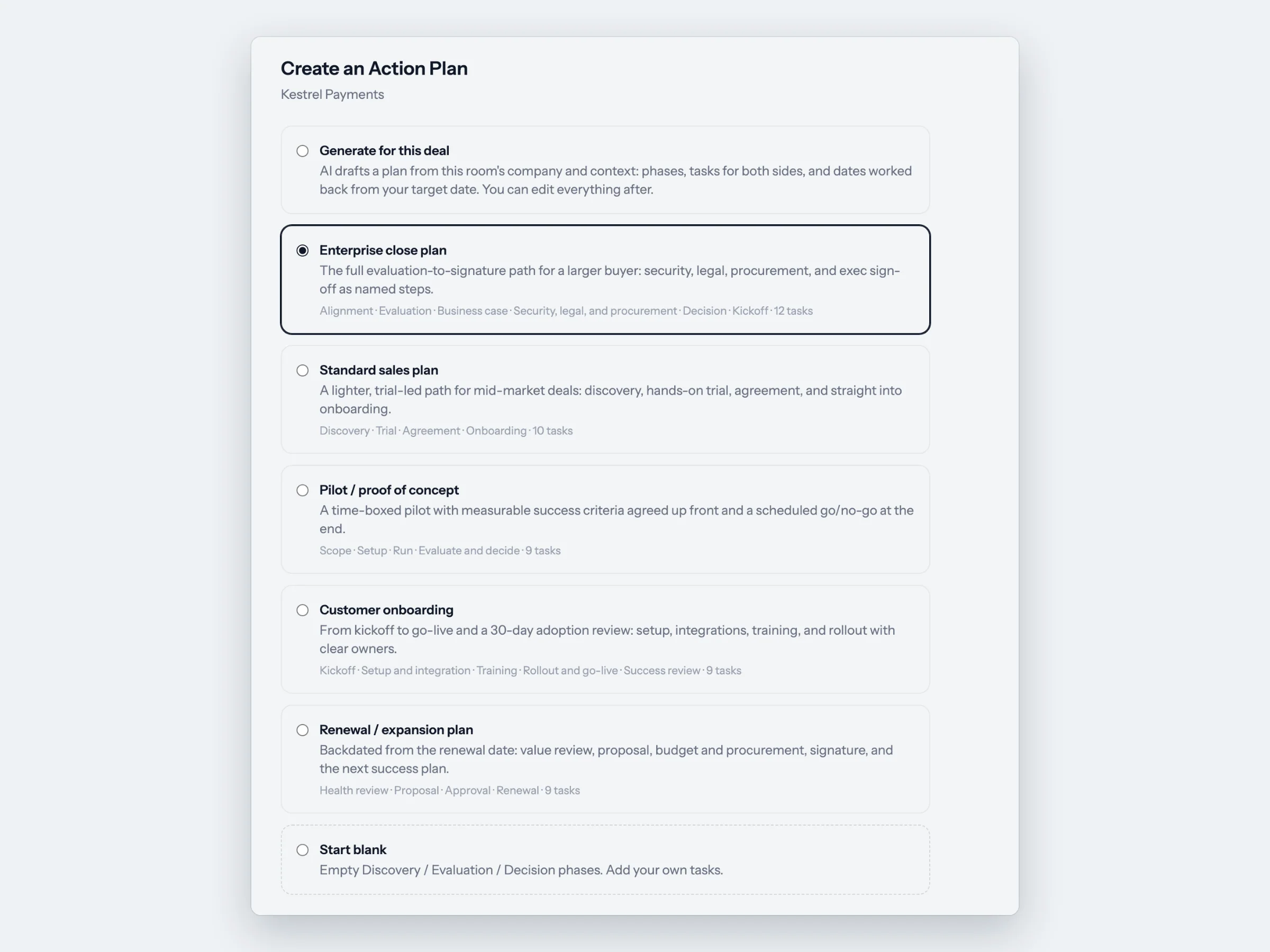
Choosing a plan template
Both sides of the plan

Both sides' steps on one dated list.

A fictional Standard sales plan for Northwind Logistics, with a target go-live of December 15. Each step has an owner side, a due date and a status both teams can see.

Your teamSteps you own
Northwind LogisticsSteps the buyer owns
Discovery
YouIntro call held and recap of goals sharedOct 31
NorthwindWider team looped in for a demoTicked off by Dana in the roomNov 5
Trial
YouTrial account activated with real dataNov 10
Both teamsTrial kickoff callNov 10
Both teamsMid-trial check-in against success criteriaNov 20
Both teamsEnd-of-trial review and decisionNov 27
Agreement
YouOrder form and terms sharedDec 1
NorthwindProcurement reviews the order formAdded by DanaDec 3
NorthwindLegal and terms review completeDec 8
NorthwindContract signedDec 10
Onboarding
Both teamsOnboarding call bookedDec 12
Buyers tick off their own steps
Buyers who entered the room with their email can check off steps on their side and add steps of their own. Steps on your side stay yours to complete. In a room with no email gate, buyers can view the plan but not change it.
Owners and details on each step
Owners link to the deal's stakeholders, and a step can carry a description and attachments, so the context stays with the step.
A list or a timeline
Switch the plan between a list and a timeline view to see what's due when.
A daily email of steps coming due
Whoever created the room gets one email a day listing plan steps that are overdue, due today or due tomorrow, across their published rooms.
Steps from your calls

Steps heard on your calls wait for you to keep or dismiss them.

When foyai drafts a room, commitments heard on the calls become suggested steps with an owner and a due date. They sit in their own part of the plan, Action items from calls, until you review them.

In the review, edit or dismiss each one, then choose Sync to Attio as tasks or Keep in this room only. Steps you dismiss don't go into the plan, and steps still waiting for review aren't in the daily email.

How AI drafts work

Review action items from your calls
Northwind · discovery call · Oct 14
Send the SSO setup guide to RajYour team · due Oct 17Dismiss
Walk Northwind's CFO through the proposalNorthwind · due Oct 22Dismiss
Share the full integration listYour team · no dateUndo
Sync to Attio as tasks Keep in this room only
2 keeping · 1 dismissedReview laterApply
In Attio

The plan's steps and progress show up on the Attio deal.

Your pipeline review can include the buyer's side of the plan without anyone copying steps across.

In the roomOn the Attio deal
You add a step to the planIt becomes a task, with the room's name and link
You keep a step suggested from a call and choose Sync to Attio as tasksIt becomes a task
Someone completes a step or changes its due dateThe task changes too, and the same works from Attio back to the room
A step is completed or reopenedFoyai MAP completion, a 0 to 100 share of the plan that's done, updates
A buyer completes a stepThe room's owner can get a Slack message naming who did it and which step

Tasks you create directly in Attio stay in Attio and aren't added to the plan. Review plan completion across your pipeline

Questions

Questions about mutual action plans

New to the idea? What is a mutual action plan? covers what goes in one and how to suggest it to a buyer.

What is a mutual action plan in foyai?
It's the action plan section of a foyai buyer room: phases of dated steps, each owned by your team, the buyer's team or both. Sellers start it from a template or from steps suggested on their calls, buyers tick off their own steps and add new ones, and the plan's steps and completion appear on the Attio deal.
Which action plan templates does foyai include?
Five: Standard sales plan, Enterprise close plan, Pilot / proof of concept, Customer onboarding, and Renewal / expansion plan. Sales and renewal plans are dated back from the target go-live or renewal date; pilot and onboarding plans run forward from the kickoff date.
Can buyers update the action plan?
Yes. Buyers who entered the room with their email can complete steps on their side and add steps of their own, and the change shows for everyone. They can't complete steps your team owns. In a room with no email gate, buyers can see the plan but not change it.
Do action plan steps sync to Attio?
The steps you add become tasks on the Attio deal, with the room's name and link. Steps suggested from calls sync only if you choose Sync to Attio as tasks when you review them. Completion and due dates stay in step in both directions, and the deal's Foyai MAP completion field shows how much of the plan is done, from 0 to 100.
How are due dates set?
When you add a plan template, you enter one date: the target go-live, the kickoff or the renewal date. foyai dates every step from it, and you can change any date afterwards. Steps suggested from calls come with the due date heard on the call, which you can edit in the review.
Does foyai remind anyone about steps coming due?
Whoever created the room gets a daily email listing plan steps that are overdue, due today or due tomorrow across their published rooms. Room owners can also get a Slack message when a buyer completes a step.