Newfoyai now builds each buyer their own deck from your Google Slides template.A deck for every buyer.

See how it worksSee how
Attio recipes · standard views only

Attio pipeline views built on buyer activity in your rooms.

Once foyai is connected, each Attio deal with a room shows what its buyers did there: an engagement score, the last time anyone opened it, how many stakeholders it has and how much of the action plan is done. These four recipes turn those fields into saved Attio views. Each takes five to ten minutes to build with filters, sorts and columns, and none needs workflows or formulas.

Updated

The view recipes use only standard Attio filters, sorts and columns.

foyai updates a handful of fields on each deal that has a room. You build the view in Attio: filter, sort, pick your columns, group by stage and save.

Anyone who can build a view in Attio can build these recipes, and a saved view shows the latest values as deals change stage and buyers visit rooms.

What you get in Attio

What foyai adds to your Attio workspace.

The fields and the rooms table are added when you connect. These are the names you'll see when you build a view.

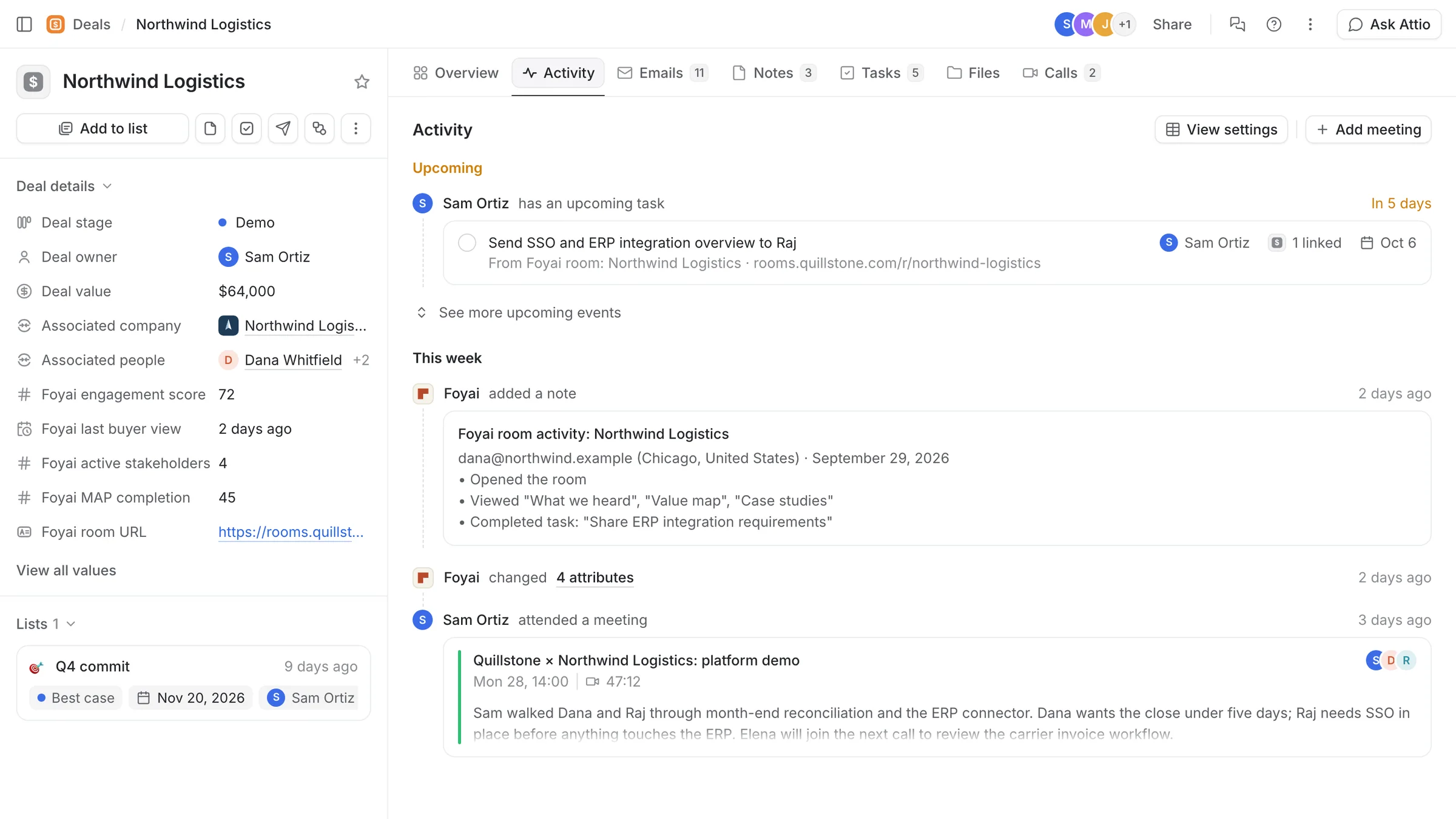
On every deal
  • Foyai engagement score: 0 to 100, based on how recently, how widely and how deeply the buyer's team used the room in the last 30 days.
  • Foyai last buyer view: when someone on the buyer's side last opened the room.
  • Foyai active stakeholders: how many stakeholders the room has.
  • Foyai MAP completion: how much of the action plan is done, 0 to 100%.
  • Foyai room URL: the buyer's link, once the room is published, plus an edit link for your team.
On every company
The room's link and edit link, so account views can show which companies have a live room.
Foyai rooms table
One row per room in your sidebar: status, engagement score, last buyer view, stakeholder count, the linked deal and company, and links to the room and its analytics.
Room activity notes
A Foyai room activity note on the deal or company for each buyer visit, with a link to the full analytics. Your team's own visits don't count.
Buyers as People
Buyers who identify themselves in a room are added to Attio as People, and attached to the company when foyai can confirm they belong there.
Plan steps as tasks
Send any action-plan step to Attio as a task with the room's link. Deadlines and completion stay in sync, so a step ticked off in Attio is ticked off in the room.
An Attio deal with its Foyai fields
Before you build

The fields update once a buyer visits a published room.

Publish a room for an open deal and send the link. The first values appear after the buyer's first visit.

Sign in with Attio
  • A workspace admin approves the connection
  • foyai adds its fields and the Foyai rooms table
Publish a room
  • Create it from a deal in Attio, or let room automation draft it
  • Review, publish, send the link
Fields update
  • Each buyer visit updates the deal within about a minute
  • A room activity note is added to the record

Need the details? Read how the Attio connection works, or see what foyai can access before your admin approves it.

Questions

About these recipes

Do I need Attio workflows or formulas for these recipes?
No. The view recipes use standard Attio views: filters, sorts, columns, kanban by stage and saved views. The room automation recipe is a setting in foyai. foyai updates the fields, and the saved view shows their latest values.
How quickly do the Foyai fields update after a buyer visit?
Within about a minute. The engagement score is recalculated about every minute while buyers are active, and a room activity note is added to the deal or company for each visit.
Where do the Foyai fields come from?
They're added to your deals and companies automatically when you connect Attio to foyai. If one is missing, open Settings → Integrations in foyai and click Re-sync on the Attio card. It only adds the missing fields and doesn't change your own Attio data.
Can I report on the Foyai fields in Attio?
Yes. They're regular attributes on the deal, so you can filter, sort and report on them like any other field.
Do the recipes work for companies as well as deals?
Companies carry the room link. For engagement at the account level, use the Foyai rooms table: every room has its linked company, status, engagement score and last buyer view, so you can filter and sort it the same way.