Newfoyai now builds each buyer their own deck from your Google Slides template.A deck for every buyer.

See how it worksSee how
Product · AI drafts

Draft each buyer room from what was said on your calls.

AI drafts turn the call recordings on an Attio deal into the first version of a buyer room: meeting notes, the buyer's goals and challenges, a value map, case studies chosen for the deal with the reason for each, and suggested steps for the plan. foyai writes the draft. You check it, edit it and publish it, and the buyer sees nothing until you do.

Updated

One discovery call, traced

Follow four lines from a discovery call into the first draft.

A fictional 38-minute discovery call with Northwind Logistics. Each number links something the buyer said to the place it shows up in the draft, which only your team can see until you publish it.

On the call Northwind Logistics · Discovery · Oct 14 · 38 min
  1. 04:12 Dana Whitfield · VP Operations Right now it takes us nine days to close the month. I want us closing in under five days by the end of Q2.
  2. 06:40 Dana Whitfield · VP Operations Every carrier invoice gets keyed in twice, once in our TMS and again in NetSuite. That's most of my AP team's week.
  3. 12:30 Raj Patel · IT lead We looked at a couple of tools last year. The demos were fine; the rollout plans weren't.
  4. 17:05 Raj Patel · IT lead Nothing touches NetSuite until we have SSO in place. That's a hard requirement from security.
  5. 31:50 Dana Whitfield · VP Operations Send me something I can share. Raj and I will walk our CFO through it next Thursday.
Transcript continues · 38 min
In the draft Northwind room · draft, visible to your team only
What we heard
  • You want to close the month in under five days, down from nine, by the end of Q2.
  • Your AP team keys each carrier invoice in twice, in your TMS and in NetSuite.
  • SSO has to be in place before anything connects to NetSuite.
Value map
What you told usHow we help 2Invoices keyed in twiceEach carrier invoice captured once and posted to NetSuite 1A nine-day closeInvoices matched as they arrive, not at month end 3SSO before NetSuiteSSO set up in week one, before the NetSuite connection
Recommended case study
How Ridgeway Freight closes the month in four daysWhy it fits: also a freight company on NetSuite, and Dana asked about closing in under five days.
Suggested for the plan
Walk Northwind's CFO through the proposal Dana Whitfield, Raj Patel · due Oct 22 Waiting for your review
Stakeholders Dana Whitfield · VP OperationsRaj Patel · IT lead
Fictional call and draft. The seller checks the names and numbers, edits what needs it and publishes before Northwind sees anything.
In each draft

What foyai drafts from each call.

Meeting notes
A short summary of each call: the outcome first, then what was covered, decisions and open questions. Buyers can switch to the full transcript.
What we heard
The buyer's goals and challenges, written to them in plain sentences, so your champion can forward it to people who weren't on the call.
Value map
Each challenge they raised, with how you answer it. Two or three sentences about what you sell, saved once in Company context, shape this part of every draft.
Recommended case studies
Up to four from your content library, matched on industry, similar challenges and shared tools, each with a one-line reason it fits this deal.
Steps for the plan
Commitments heard on the call, with an owner and a due date. They wait in their own part of the plan until you keep or dismiss them.
Stakeholders
The people on the calls, added to the room's stakeholder list. Their email domains go onto the room's list of allowed domains.

Your own sections. Add a Deal Content section from a preset such as What we heard or Value map, or write your own prompt for anything else your buyers expect to see. You can also write the section yourself. The building blocks of a room

Call recordings

Draft from Attio call recordings or the recorder your team already uses.

Calls recorded in Attio work with no extra setup. You can also connect Fathom, Fireflies.ai, Avoma, tl;dv, Grain or Granola, which are in beta. foyai matches each call to a room or company by the email addresses of the people on it, and sets aside calls with only your own team on them.

When a call could belong to more than one room, it's marked as a suggested match for you to confirm. foyai keeps each call's title, date, and participants, and reads the transcript from your recording tool when it drafts. If you add a Meeting Notes section to a room, it keeps that call's summary and full transcript, and buyers can open the transcript. Granola calls arrive on a sync that runs about once an hour.


How transcript sources work

Starting a draft

Start a draft from the deal's calls in foyai or in Attio.

In foyai. Go to Rooms → New room and choose From recording or From CRM record. The deal's calls come selected; untick any you don't want, up to 30 per draft, then pick a template.

In Attio. Create Foyai Room on a deal or company drafts the new room from that record's calls. Generate Foyai Draft from Calls fills an existing room from the five most recent completed calls.

When a deal reaches a stage. Map the stages that should get a room, and foyai creates and drafts one for you to review. How automation works
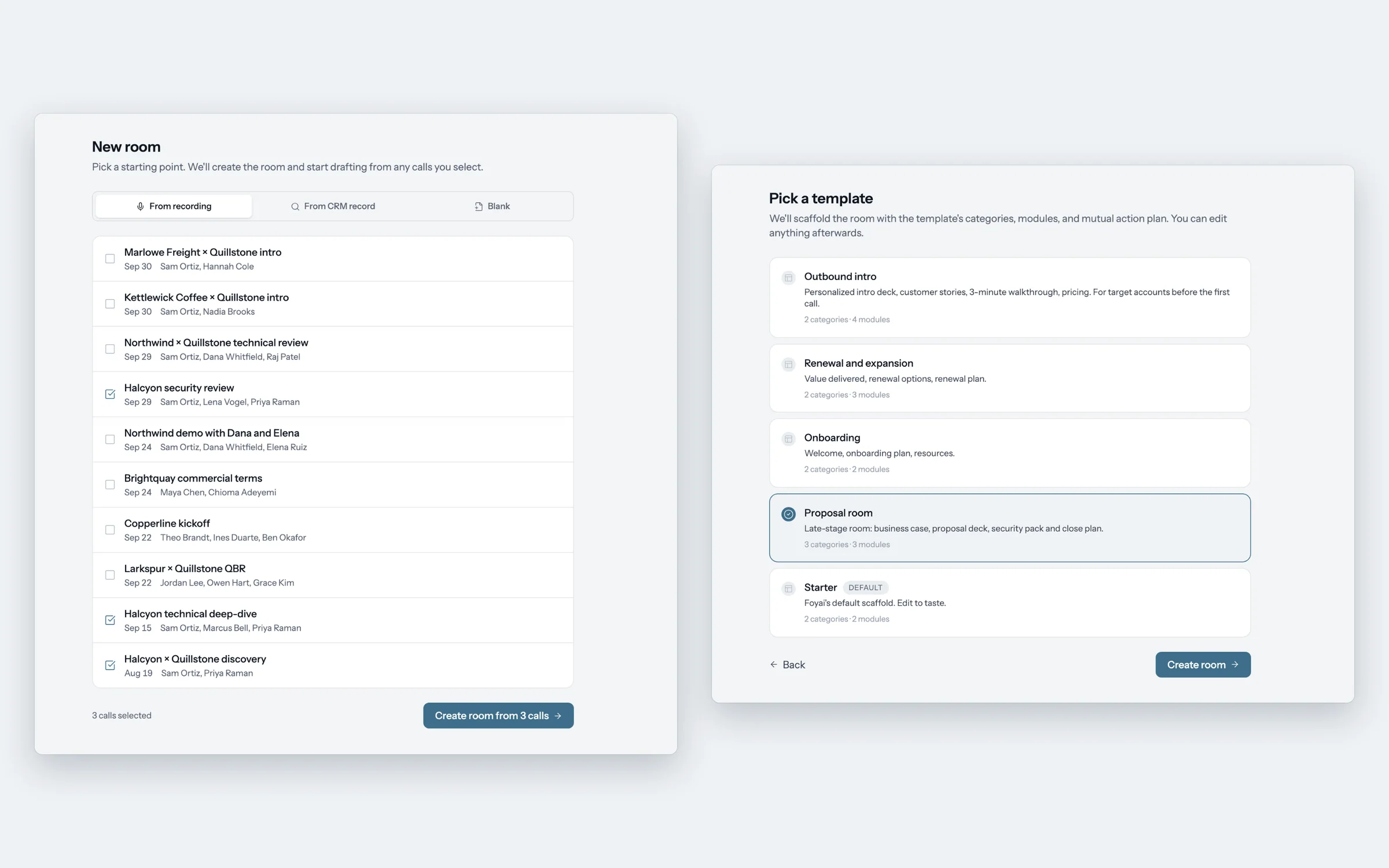
Starting a room from recent calls
Before the buyer sees it

You decide what stays before anything is published.

  1. Keep or dismiss the suggested steps

    Action items heard on the call arrive marked for review. Keep the real ones and dismiss the rest. Only the ones you keep can go to Attio as tasks.

  2. Edit the room like any page

    Rewrite a sentence, remove a case study, reorder the sections or add your own content. Check names, figures and dates against what you know about the deal.

  3. Publish when it's right

    Publishing asks you to confirm who can open the room and, the first time, to review the AI-written content. It waits while a section is still being written, and warns you about a section that failed so you don't publish it empty.

After the next call

Accept or dismiss the updates each new call suggests.

When a new call is added to the deal, foyai compares it with the room and lists suggestions on the room's Intelligence page: add a section, update a section, add a stakeholder, or update the buying committee. Each one has Accept and Dismiss.

Accepted changes go into your draft. Buyers keep seeing the version you last published until you publish the changes, at the same link.

Northwind · call on Oct 21 · Maria Chen (CFO) joined
3 suggested updates
+Add stakeholder: Maria Chen, CFOAcceptDismiss
~Update What we heard: target close moved to AprilAcceptDismiss
+Add section: SSO and security reviewAcceptDismiss
Northwind sees accepted changes after you publish them.
Limits

What to check before you publish a draft.

We'd rather you know these before your first draft than find them in front of a buyer.

Calls on the record
Drafts come from calls linked to the deal or company. A record with no calls gets its template content and no call-based draft. Build it by hand, or draft it once a call is recorded.
Names and numbers
The draft is written from transcripts. Check names, figures and dates before you publish; the publish step reminds you that AI can make mistakes.
Buying committee roles
Roles such as champion or economic buyer are inferred from the calls and shown with a confidence label. Treat them as a guess to check against what you know.
Internal calls
Calls with only your own team on them are set aside and don't go into anything a buyer sees.
How many drafts
Free includes 3 AI drafts. Pro includes 30 AI generations per seat each month, pooled across the team, and Platform includes unlimited AI generations, subject to fair use. A personalized deck uses one too. Pricing
Questions

Questions about AI drafts

What does foyai draft from a sales call?
From the call recordings on an Attio deal or company, foyai drafts meeting notes, the buyer's goals and challenges (What we heard), a value map, up to four recommended case studies with a reason for each, action items for the plan with owners and due dates, and the stakeholders on the calls. The seller reviews and edits the draft, then publishes it.
Which call recorders can foyai draft from?
Attio's own call recordings, with no setup. Fathom, Fireflies.ai, Avoma, tl;dv, Grain and Granola connect as transcript sources, which are in beta. Zoom, Google Meet, Microsoft Teams, Gong, Read.ai and Circleback are listed as coming soon.
Does the AI send anything to my buyer?
No. A draft is visible only to your team. The buyer sees the room after a seller publishes it, and the first publish asks you to review the AI-written content. Suggested updates from later calls also wait for you to accept them.
What happens when there's a new call on the deal?
foyai compares the new call with the room and suggests updates on the room's Intelligence page, such as a new stakeholder or a change to a section. You accept or dismiss each one, and buyers see accepted changes after you publish them.
What if a deal has no call recordings?
foyai drafts only from calls on the record. A room for a deal or company with no calls gets its template content but no call-based draft. You can build the room by hand, and fill it from call recordings once a call is recorded.
How many AI drafts are included in each plan?
Free includes 3 AI drafts. Pro includes 30 AI generations per seat each month, pooled across your workspace. Platform includes unlimited AI generations, subject to fair use. Each draft, each re-draft you start, and each personalized deck uses one. Suggested updates after a new call don't. See pricing.