 +
+
Use your team's Fireflies.ai calls to draft each deal room.
Connect Fireflies.ai to foyai and the calls your team records are matched to their Attio deals and used to draft each buyer room: what the buyer said, the next steps, the case studies that fit. You review the draft before you publish it. One workspace connection can cover the whole team. The integration is in Beta.
Updated
What foyai takes from Fireflies.ai and drafts from each call.
What comes across
- Call details: title, date and who was on the call.
- The transcript, when needed. foyai reads it from Fireflies.ai when drafting. A Meeting Notes section in a room keeps that call's summary and full transcript.
- Only buyer calls. Calls with just your own team are ignored.
- One copy per meeting. If the same meeting arrives from two recorders, the duplicate is flagged.
What it powers
- A drafted room: "What we heard", a value map, goals, challenges, their stack, and who's involved.
- Matching case studies: up to four case studies from your library, each with a reason.
- Next steps: action items from the call for you to approve into the plan.
- Updates after later calls: suggested changes after each new call, which you approve.
Setup takes one visit to foyai and one to Fireflies.ai.
Most of it happens in foyai. The last step is one paste into Fireflies.ai so new calls arrive when they're processed.
Start the connection
In foyai, go to Settings → Integrations → Manage transcript sources, and click Connect on Fireflies.ai.
Paste your Fireflies.ai API key
The connect window links to the page in Fireflies.ai where your key lives. Paste it in and choose who the connection covers: the whole workspace, or just you.
Copy the webhook URL into Fireflies.ai
After connecting, foyai shows a webhook URL and exactly where it goes in Fireflies.ai. Paste it there and new calls arrive as soon as they're processed.
Check the card
The Fireflies.ai card shows your account and starts importing recent calls. Matched calls appear wherever you pick calls for a room.
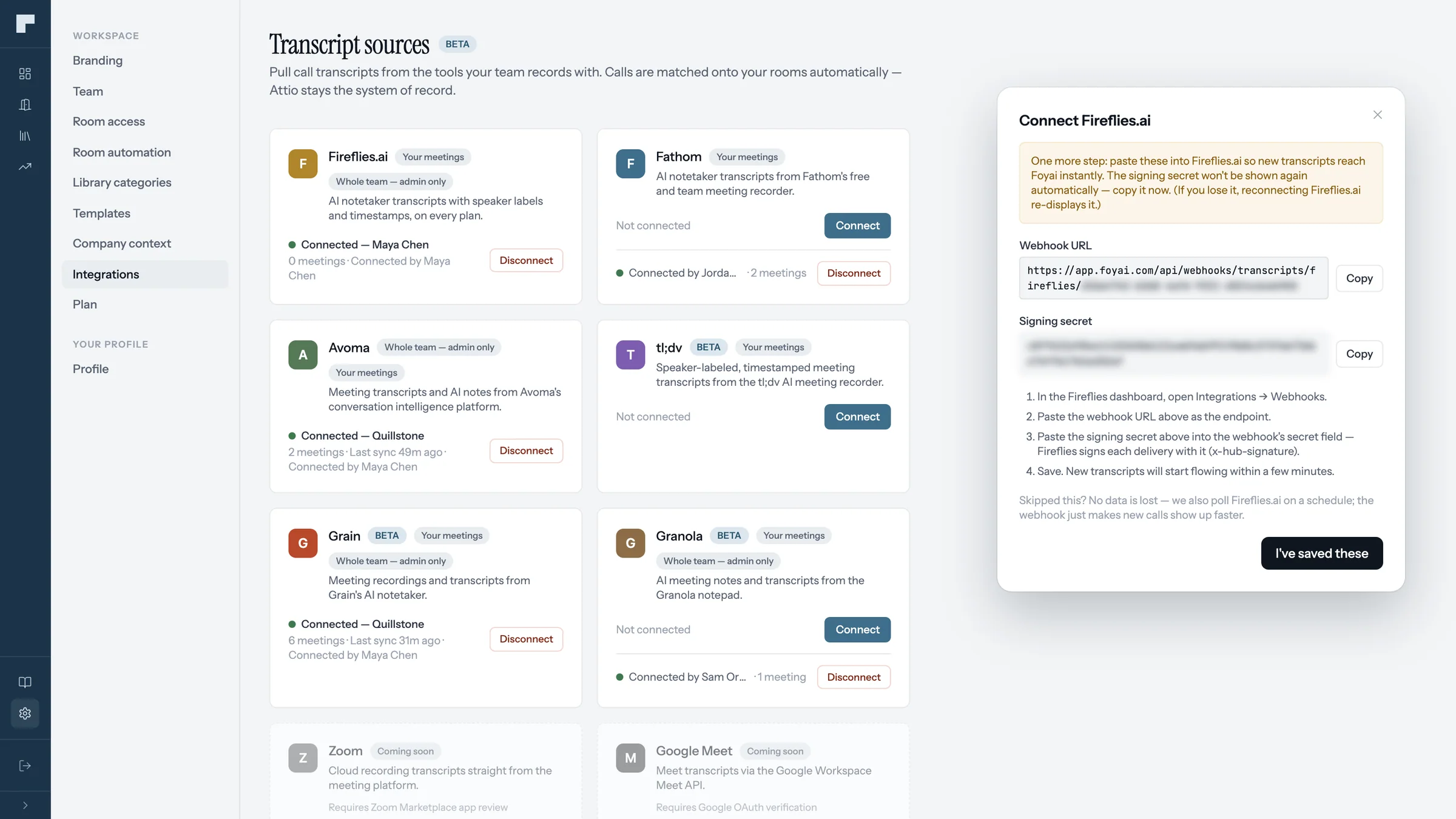
Add the webhook URL so calls arrive when they're processed.
Fireflies.ai needs you to add that URL yourself; foyai can't do it for you. If you skip it, the connection still works and calls arrive on the catch-up sync.
Who was on the call decides where it goes.
When a match is uncertain, foyai asks you to confirm it before the call is used, so a transcript doesn't end up in the wrong buyer's draft.
| Who was on the call | Where it goes |
|---|---|
| A stakeholder in one of your rooms | That room. |
| Someone whose email domain matches a company in Attio | That company, ready for its deal's room. |
| Only people from your own team | Ignored, so internal calls aren't used in buyer material. |
| People who could belong to more than one deal | Unmatched calls, with a suggested match to confirm in one click. |
| Only personal email addresses, or a company not in Attio yet | Unmatched calls, for you to attach to a room or ignore. |
Hover any match badge in foyai to see the reason, for example, that a participant's email belongs to a stakeholder in this room. How matching works in detail.
Draft a room from your team's next Fireflies.ai call.
Start free with Attio