You'll also hear digital sales rooms called deal rooms, buyer rooms or buyer portals. The idea is the same. Instead of sending a buyer a trail of follow-up emails, attachments and shared-folder invites, you send one link. Everything about the deal lives behind it, and the seller keeps it current for as long as the deal is open.
This guide covers what goes in a room, why sales teams adopt them, how they compare with the tools you already use, and what to check before you choose one.
What's inside a digital sales room
Most rooms are built from the same five parts. The order changes with the deal stage, but the pieces stay the same.
- A recap or business case. The buyer's situation, goals and challenges as they described them, written so your champion can forward it to people who weren't on the call. Early in a deal this is a call recap. Later it grows into a business case. (Here's a free one-page business case template.)
- A mutual action plan. The dated steps both sides take between now and a signed contract, with a named owner on each one. See what a mutual action plan is.
- Content. The demo recording, the deck, case studies close to the buyer's situation, security documents, pricing. Only what this deal needs, not your whole library.
- Contacts. Who's who on both sides, plus an easy way to book time with the seller.
- A link to the proposal or contract. Most rooms point to the order form or contract wherever it lives, so the buyer's last step starts from the same page as the first.
A good room is short. If a buyer has to scroll past twenty files to find the pricing, cut some of the files.
Why sales teams use them
B2B purchases rarely have a single buyer. A champion, a budget owner, someone from IT or security, sometimes legal and procurement: several of them may never join a call with you. A room is built for that reality.
One link for the whole buying committee
Your champion has to sell your product internally, to people you may never meet. A room gives them one link to forward instead of a thread of attachments to reassemble. Everyone sees the same recap, the same plan and the latest version of the deck.
Follow-up that doesn't get buried
A follow-up email gets pushed down the inbox by everything that arrives after it. A room stays at the same address for the whole deal. When something changes, you update the room, and the link the buyer saved shows the new version.
A record of who opened what
Rooms show you who opened what. When the budget owner views the pricing section for the first time, or a new name from the buyer's security team appears, you can use that in your forecast. When nobody has opened the room in three weeks, that tells you something too.
How a sales room differs from email, a shared drive or your CRM
Sellers already have places to put deal material. Each one does something well, but none of them gives a buying committee one shared page to work through a decision together.
| Tool | Good at | Where it falls short for buyers |
|---|---|---|
| Email with attachments | Fast and familiar, no setup | Every send creates another copy. The context lives in the thread and gets lost when files are forwarded. You can't see who on their side read what. |
| A shared drive folder | One place for files, with permissions you control | Files without the story: no recap, no plan, and no sign of which files mattered. People outside the first invite may hit access requests. |
| Your CRM | The seller's system of record for the deal | Built for your team, not the buyer. Buyers never see it, so it can't hold a plan both sides work from. |
| A digital sales room | One buyer-facing page with recap, plan, content and contacts | One more thing to build per deal, unless it's drafted for you. Only as useful as its connection back to your CRM. |
A room doesn't replace the others. Email still delivers the link, your files can still live in Google Drive, and the CRM stays the system of record. The room is the buyer-facing layer that ties them together.
What to look for when choosing one
Most sales room tools cover the basics: a branded page, embedded content, view tracking. The differences that matter show up after the first month, when the novelty wears off and reps decide whether to keep using it.
How deep the CRM connection goes
Ask what flows back to your CRM, and where it shows up. Is buyer activity written onto the deal record where your pipeline review happens, or does it stay in a separate dashboard? Can you filter and report on it? Do plan steps become tasks in the CRM?
Who builds the rooms
A room only helps if reps make one for every deal. Look at how much is created for you: from a CRM record, from a template, from the call recording. Rooms created automatically when a deal reaches a stage leave reps less to do, as long as they still review each draft before a buyer sees it.
Buyer access without accounts
Many buyers won't create an account to read your follow-up. Check how access works: an open link, a check against their email domain, a one-time link sent to their inbox. Make sure you can tighten access on a sensitive deal without asking anyone for a password.
Analytics that reach your CRM
You want to know who viewed, which sections, for how long, and whether new stakeholders appeared. Then check whether that activity shows up somewhere your managers already look, like a field on the deal they can sort the pipeline by.
Pricing you can see
Some vendors publish their prices; others quote after a demo. Published pricing, a free plan or a trial lets you test the tool on a live deal before you commit a budget to it.
The main types of digital sales room tools
The market splits roughly into two groups.
Multi-CRM sales room suites
Platforms such as Dock, Trumpet and GetAccept are built to work with several CRMs, most commonly Salesforce and HubSpot. They cover more than sales rooms: depending on the vendor, that can include proposals and quotes, customer onboarding portals and content management. They suit teams that want one vendor for several buyer-facing workflows, or that run more than one CRM. Features and pricing change often, so check each vendor's site for the current picture. For a side-by-side on one of them, see foyai vs Dock.
CRM-native sales rooms
The other approach builds the room around a single CRM. Instead of syncing with many systems, it goes deep on one: rooms created from CRM records, engagement written into fields on the deal, plan steps as tasks in the CRM. foyai takes this approach for Attio. The trade-off is simple: a CRM-native tool only fits if you use that CRM.
Neither approach is better in general. If your team runs on Salesforce or HubSpot and wants a broad suite, a multi-CRM platform is the natural fit. If your team runs on Attio and wants the room to feel like part of the CRM, a native tool will save more clicks per deal.
Digital sales rooms on Attio
foyai is a digital sales room built natively for Attio. For each Attio deal, it uses AI to draft a private, branded buyer room from the deal's call recordings and your content library. You review the draft and publish it. Nothing reaches the buyer until you do.
- Rooms start in Attio. Create a room from any deal or company with the Create Foyai Room action, or map deal stages so a room is created and drafted automatically when a deal reaches one of them. See room automation.
- Drafts come from your calls. foyai reads the deal's transcripts from Attio's call recordings or a connected recorder like Fathom, Fireflies.ai, Avoma, tl;dv, Grain or Granola. It drafts the recap, goals and challenges, suggests action plan steps, and recommends up to four case studies from your library, all for you to edit before publishing. See AI drafts and integrations.
- Buyers just open a link. No accounts or passwords. You choose how strict access is, from an open link to verified email for named stakeholders only. See room access.
- Buyer activity is written to the deal. Each deal gets an engagement score, last buyer view, active stakeholders and plan completion as Attio fields you can sort, filter and report on, plus a note for every buyer visit. See Attio recipes.
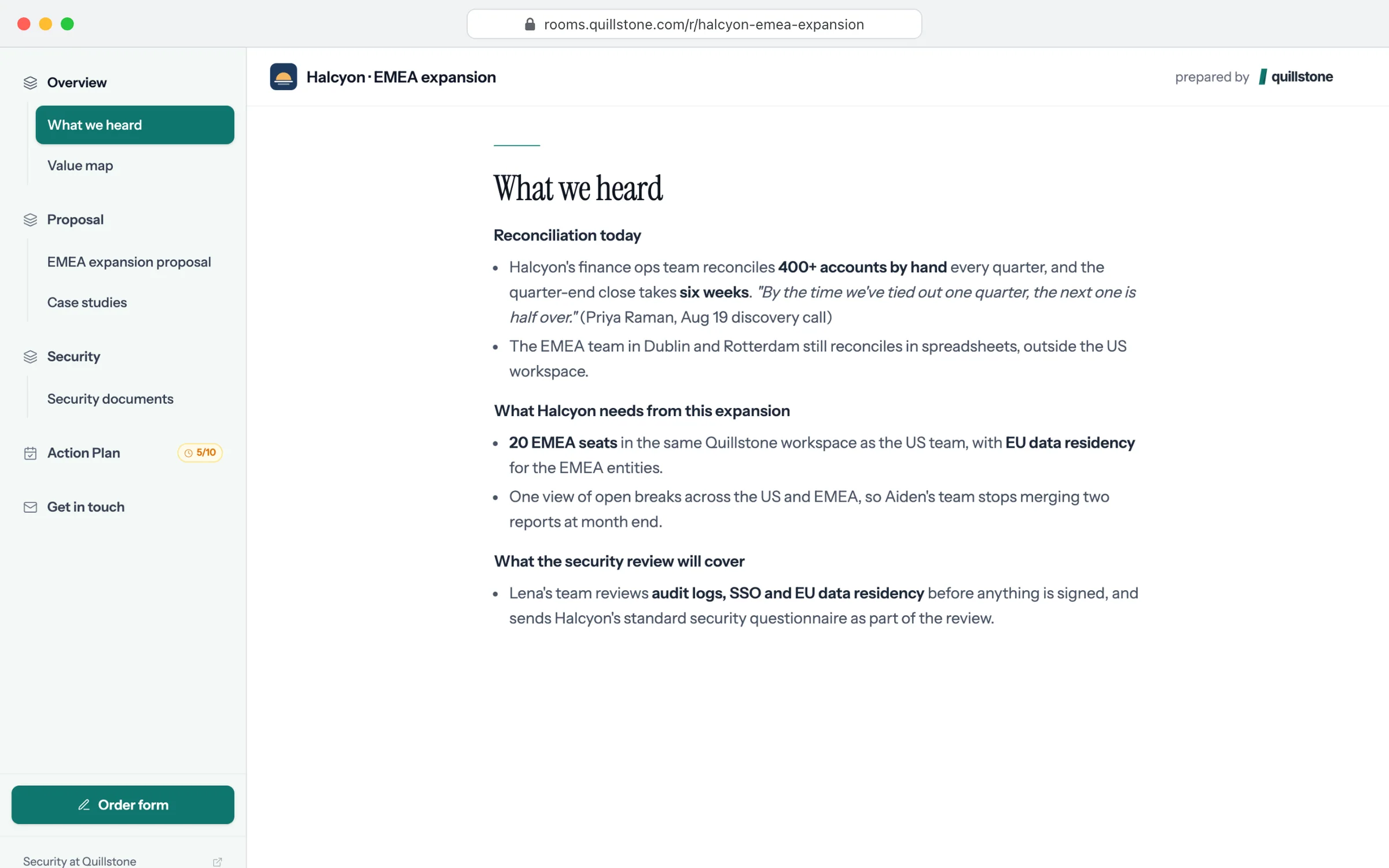
You can open a real room to see the buyer's side. foyai is listed in Attio's app store, has a free plan, and publishes its pricing.