One room for the whole buying committee including the people you haven't met yet.
For enterprise deals, foyai puts the entire buying committee in one private room: access limited to verified emails at their company's domain, an Enterprise close plan with security, legal and procurement as named steps, your security documents in the room, and a view of which stakeholders have opened the room and which haven't. foyai drafts the room from your calls, and you review it and choose who gets access before you publish.
Updated
Several people on the buying committee may never join one of your calls.
They read whatever your champion forwards: a deck from March, a pricing PDF, a summary written from memory. A room gives them one link you control, with the current versions, and shows you who opened it.
Every stakeholder sees the same recap, the same content and their own steps on the plan. They don't need an account or password, and they see the version you last published.
Visitors confirm their email with a single-use link that expires in 15 minutes. Limit entry to the buyer's domains, named addresses, or the room's stakeholders only.
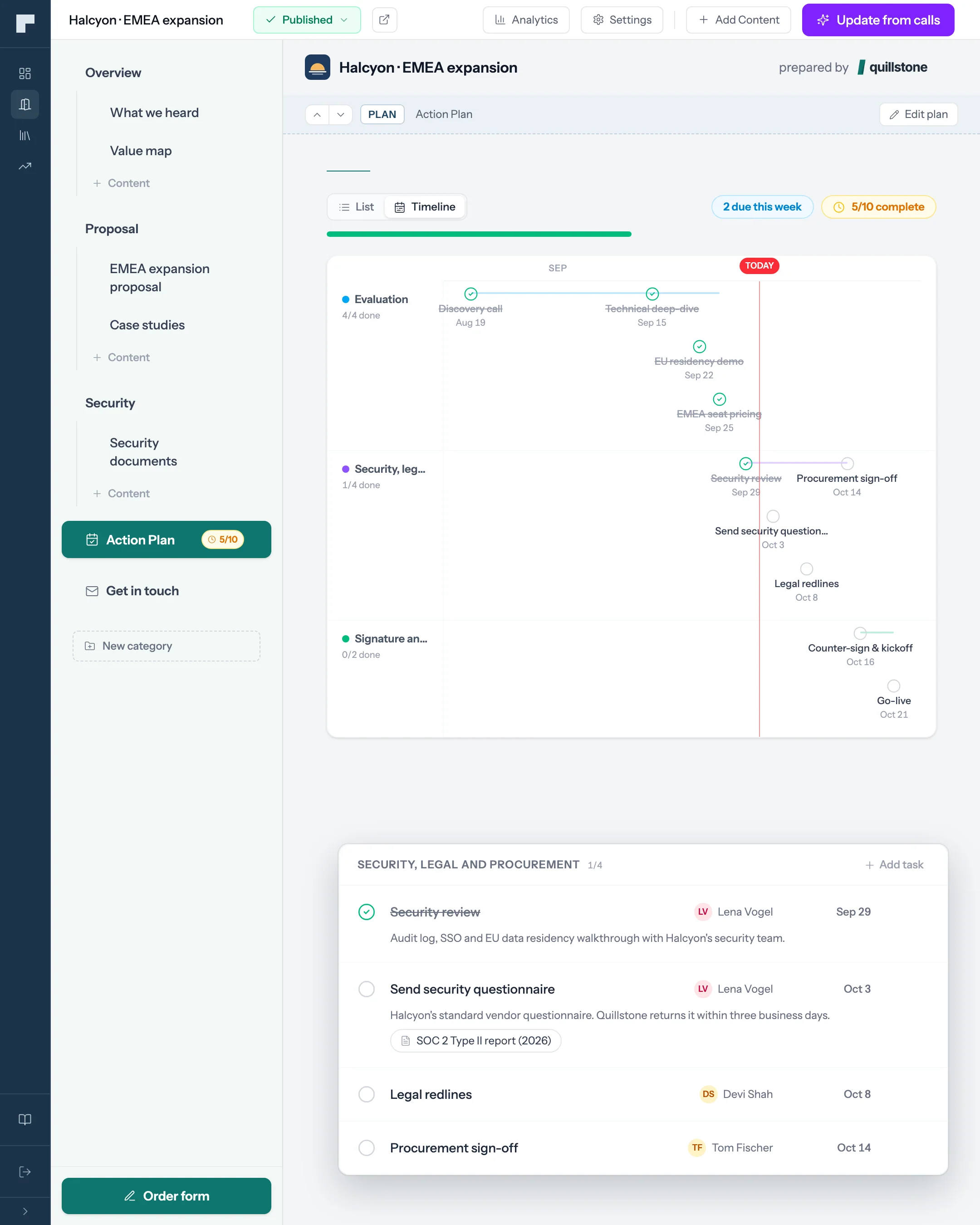
Security review, legal redlines and procurement sit on the plan with a person from their side and a date next to each.
What each person on the committee needs and where they find it.
An illustrative committee. Yours will differ; start from the stakeholders foyai pulls out of your calls and add the ones your champion names.
| Stakeholder | What they need from you | Where it lives in the room | What you see |
|---|---|---|---|
| Champion | A story they can retell internally without you | "What we heard" and "Value map" sections, drafted from your calls | Return visits and the sections they reopen |
| Economic buyer | The business case and the price | A business case section and your proposal deck, viewable inline | Which slides they viewed, and for how long |
| Security reviewer | Your current security documents | PDFs or Google Drive files, shared only with people who pass the room's access check | Whether and when they opened each one |
| Legal | The contract and terms | Your contract or order form, linked from the room's Agreement button | Their legal review step, ticked off by them |
| Procurement | Vendor details and a realistic timeline | The procurement step on the plan, with an owner and a date | Step status, also synced to Attio as a task |
| IT or end-user lead | How it works day to day | Demo videos, interactive demos and setup docs | Video plays and content opened |
Building the business case section? Start from the free business case template.
The paperwork goes on the plan in week one.
Start from the Enterprise close plan, enter the go-live date the buyer is working toward, and every step is dated back from it. It ships with six phases:
Alignment
Goals and success criteria agreed; your champion maps the approval path.
Evaluation
Deep-dive demo for the evaluation team, then technical validation.
Business case
Proposal delivered, then an executive review with the economic buyer.
Security, legal and procurement
Your docs shared, then three reviews owned by people on their side.
Decision
Contract signed.
Kickoff
Implementation kickoff scheduled.
Stakeholders tick off their own steps and add the ones you missed; any step can go to Attio as a task. Why shared plans work.
See which stakeholders have opened the room and which haven't.
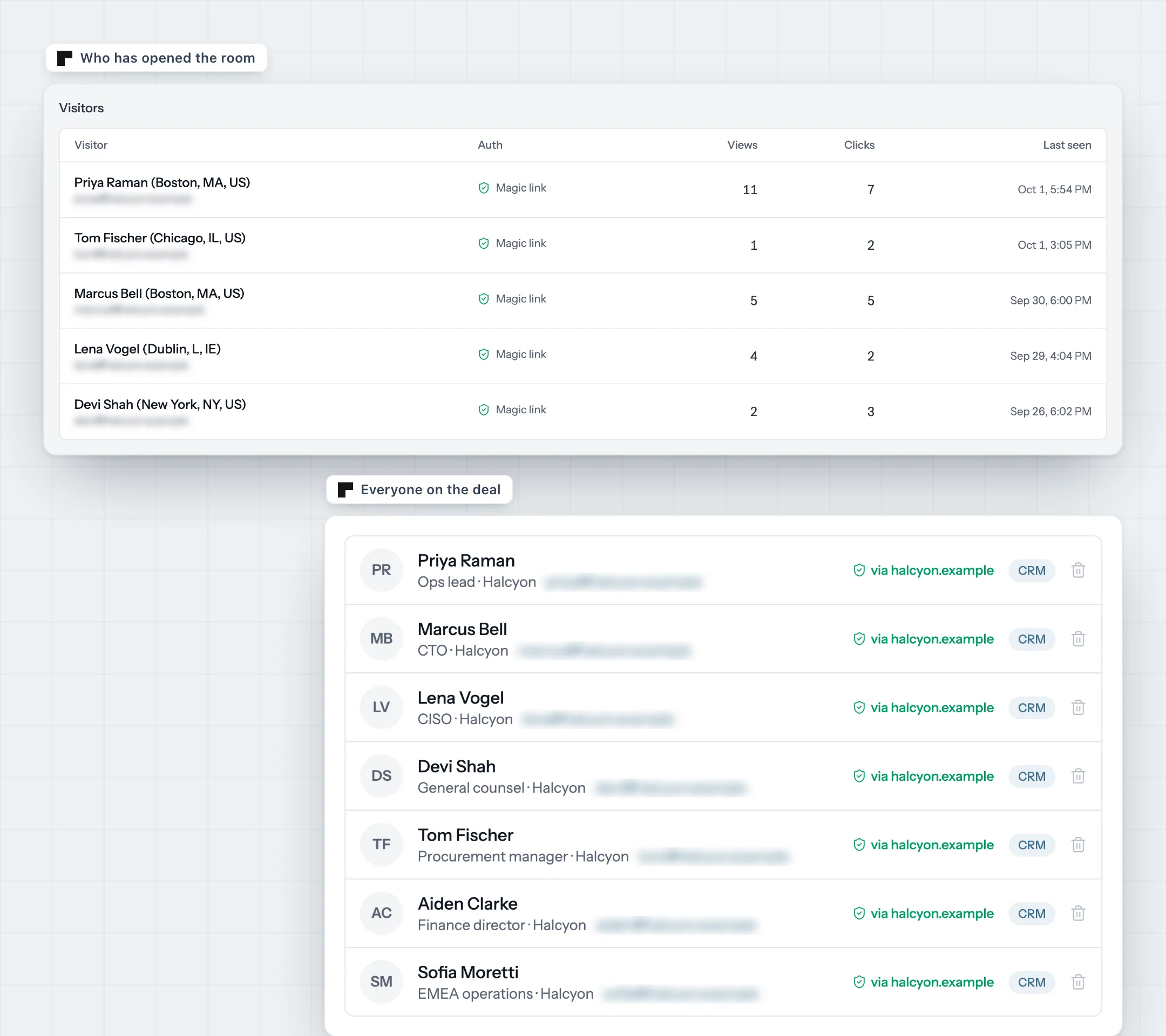
Every visitor who passes the email check appears by name, with what they viewed, which slides they spent time on and when they came back. Put that next to the room's stakeholder list: anyone on the list who isn't in the visitor table hasn't opened the room. If that's the CFO three weeks before your close date, you know which conversation to have next.
In Attio, the deal carries the room's active-stakeholder count, an engagement score that rises as more distinct stakeholders show up, and plan completion. Sort the pipeline by those fields alongside the deal stage.
Limit the room to their company and close it when you choose.
Their security team will ask about foyai too. Here's how we handle data.