See which commit deals have unfinished action plans.
You'll end up with two Attio views for pipeline and forecast review: a kanban of deals by stage showing each deal's Foyai MAP completion and active stakeholders, and a list of commit-stage deals whose action plan is less than half done. Both take about ten minutes with standard Attio views. Send plan steps to Attio as tasks and the owners see them where they already work.
Updated
Ask about any commit deal whose action plan is only 20% done.
Say a rep calls a deal commit for this month. The action plan in the buyer's room shows the security review hasn't started and nobody from legal has been named. That's the conversation to have on the forecast call, and this recipe puts it on the screen before anyone gives an update.
The plan is shared with the buyer, and buyers tick off their own steps, so its completion reflects steps both your team and the buyer have marked done.
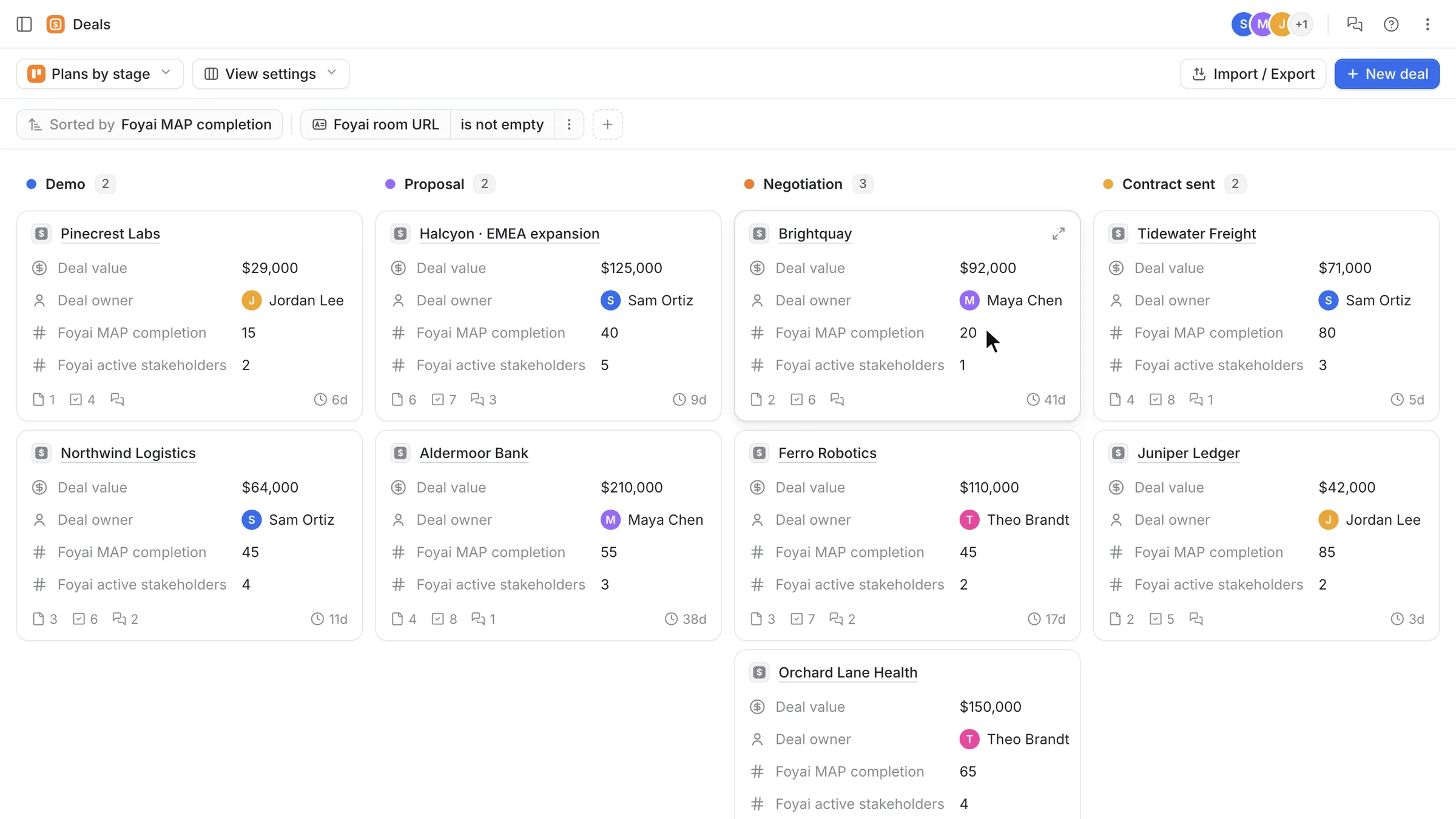
A kanban for pipeline review and a list of commit deals.
The kanban shows plan progress across every stage at once. The table lists the commit deals whose plan is less than half done.
Set up the kanban and the commit list in six steps.
Make sure deals have plans
Plan completion only means something if the room has an action plan. Start from one of the five plan templates in foyai (standard sale, enterprise close, pilot, onboarding, renewal) and review the steps foyai suggests from your calls.
Create the kanban
In Attio, open Deals, create a new kanban view grouped by Stage, and filter to deals where Foyai room URL is not empty, so deals without a room don't show up as 0%.
Put the two numbers on the cards
Show Foyai MAP completion and Foyai active stakeholders on each card, and sort by MAP completion, lowest first.
Create the commit list
New table view. Filter Stage to the stages you count as commit, and Foyai MAP completion to less than 50.
Add the columns and save
Add MAP completion, active stakeholders and last buyer view next to Value and Owner. Save both views.
Send key plan steps to Attio
In each room, send the steps your team owns to Attio as tasks. They carry the room's name and link, and completing one in Attio updates the room.
Read the two numbers together.
Plan completion shows how many agreed steps are done. Active stakeholders shows how many people are on the room's stakeholder list. The table below is a rule of thumb for what to ask the rep.
| What you see | What it often means | Ask the rep |
|---|---|---|
| High completion, several stakeholders | The buying team is completing its steps. | "What's the last step, and who on their side owns it?" |
| High completion, one stakeholder | Your champion is working hard, possibly alone. The economic buyer may not be in the room yet. | "Who signs, and have they seen the plan?" |
| Low completion, several stakeholders | Several people are involved, but the steps may not be agreed, or the plan is out of date. | "Has the buyer agreed to these dates? When did we last review the plan together?" |
| Low completion, one stakeholder | A single thread in a commit stage. The highest-risk combination on the board. | "What would have to happen this week for this to still close on time?" |
New to action plans? Start with what a mutual action plan is, or copy the free template.
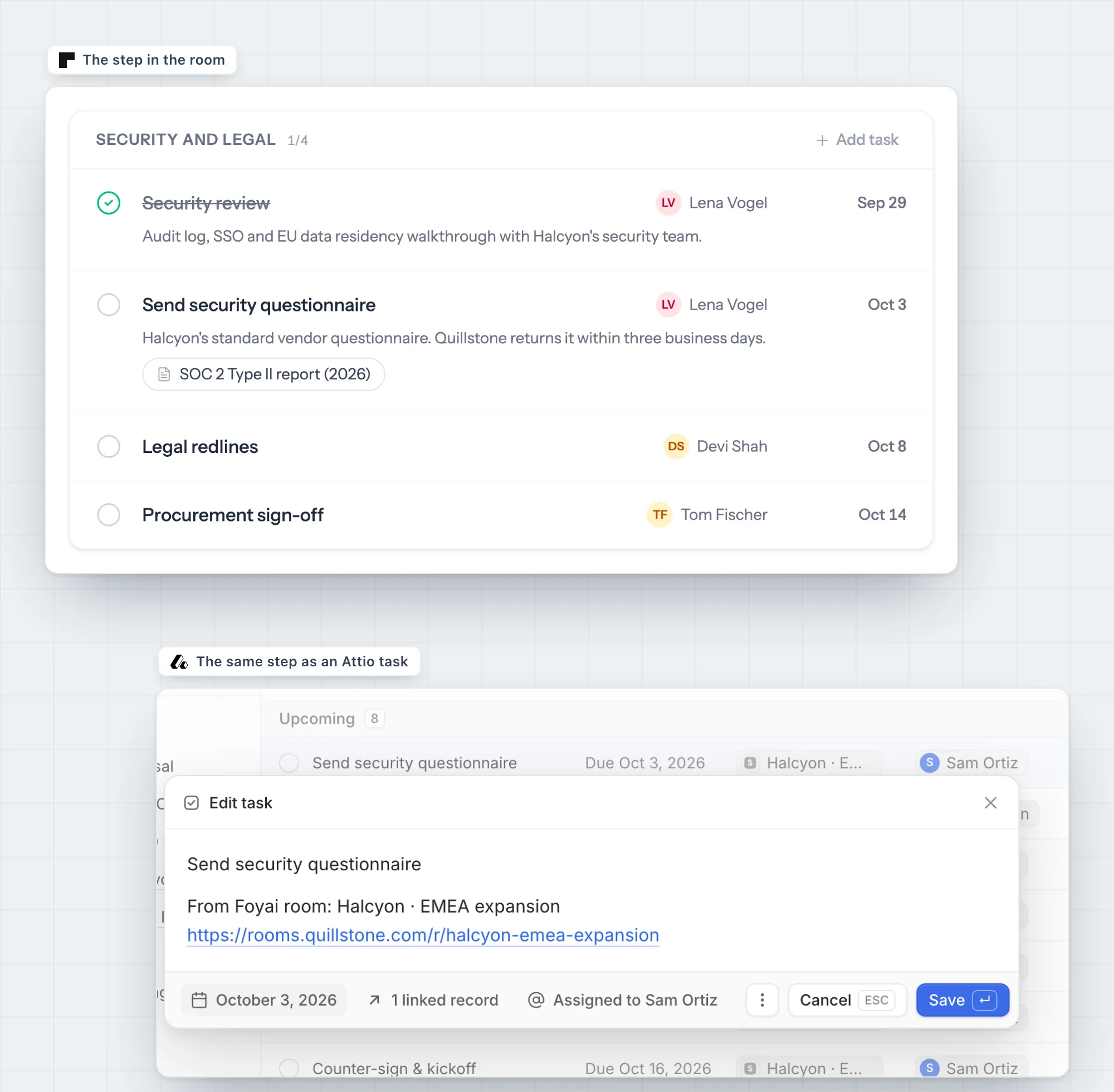
Send your team's plan steps to Attio as tasks.
Send the steps your side owns to Attio as tasks, so your team sees them between meetings. Each one carries the room's name and link, with the deadline from the plan.
Deadlines and completion stay in sync. When a teammate completes the task in Attio, the step is ticked off in the room the next time the plan is opened, and the deal's MAP completion moves with it. Your existing Attio tasks stay yours; foyai only syncs the tasks it created.