
Attio AI is the set of features inside Attio that search your CRM data, run agents, record calls and automate workflows. It is strong on the seller’s side of a deal: knowing the account, logging the call, updating the record. The buyer’s side is where deals still stall, because the person across the table is sifting through decks, emails and recordings. Foyai is built to close that gap: it drafts a personalized deal room from an Attio deal and syncs buyer engagement back to the pipeline record.
This guide walks through what Attio AI does, what data it reads, how agents and credits work, and how to pair it with a buyer-facing room.
TL;DR
- Attio AI has three layers: Ask Attio (chat over your CRM), agents and workflows (automation), and call intelligence (recording and summaries).
- Ask Attio is on every plan. Call recording and Call Intelligence need a Pro plan, and usage is metered in credits.
- Agents run with the permissions of the member they are assigned to, and every run is on the record.
- Attio AI organizes what you know. A buyer still needs one place that shows them what matters, which is the job of a deal room.
- Foyai drafts that room from your Attio deal and call content, and engagement data flows back to Attio.
Table of Contents
The three layers of Attio AI
Ask Attio: chat over your own CRM
Ask Attio is the conversational layer. According to Attio’s help documentation, it searches calls, notes, emails and records, answers questions, summarizes information, builds workflows, creates or updates records, creates tasks, drafts emails and runs SQL queries. It also does web research and understands multiple languages.
Two guardrails matter for sales managers. Every suggested record change requires approval, and email drafts must be reviewed and sent manually. Nothing is written to your pipeline or sent to a prospect without a person clicking.
Attio describes the search as semantic rather than keyword-based. In its launch post for Ask Attio, the example is asking which customers would benefit from a new feature. The answer surfaces people who described similar pain points on calls or showed interest through usage, with context on fit, rather than every note containing a matching word.
Agents and workflows
The second layer is automation. Attio’s platform page for agents and automations lists pre-built agents for revenue jobs: a Web Agent for live account research, a Scoring Agent for ICP fit, a Routing Agent that assigns leads and drafts an email, plus Win/Loss, Onboarding, Coaching, Prospecting and Enrichment agents.
In Attio’s June 2026 Workflows post, the use cases named are prospecting, triaging leads against your ICP with personalized openers, pre-call briefings, meeting follow-ups, reviving stalled deals, and signal-based outreach on funding rounds, executive changes and hiring spikes.
Call intelligence
The third layer is embedded call intelligence. Attio records, transcribes and logs calls, flags buying signals, blockers or requests as they come up, and lets reps track action items and draft next steps before they leave the call. Everything syncs to the CRM.
This matters for the rest of this article. A call transcript sitting on a deal record is the raw material for what the buyer needs to see next.
What Attio AI can see
An AI feature is only as useful as the data behind it. Ask Attio reads calendar events (subject to permissions), call recordings and transcripts, workspace notes, emails the user can access, records across all objects, lists, workspace members and teams. Email and calendar must be synced first, or it cannot reach emails and meetings, per the Ask Attio documentation.
Attio calls the underlying layer Universal Context. It indexes records, emails, calls, notes, product data and connected tools as one interconnected whole, so signals keep their relationships (Attio). Attio’s argument is that agents are only as good as their context: an outreach agent that cannot see the last three meetings writes generic emails (Attio, June 2026).
The practical takeaway: connect email and calendar before you judge any of these features. A sparse workspace produces thin answers.
Setting up agents and workflows
Custom agents are configured in a handful of choices, according to Attio’s custom agents reference:
- Write the instructions in plain language.
- Choose a model from OpenAI, Google or Anthropic.
- Select the read tools and connected apps the agent may use.
- Choose which member’s identity and permissions it runs under.
- Define the output, either plain text or a JSON schema.
Agents run as a workflow block or as an AI attribute on a record. They act with exactly the permissions of the assigned member, and users can pause, cancel, resume or replay any run.
A useful pattern from Attio’s own docs is approval gating. A workflow can ask a sales manager to approve any deal whose Discount attribute exceeds 15%, with the request email linking to the deal’s quote. The same logic suits any step where a human should sign off before something goes external.
A starter set worth building
- Pre-call brief: an agent that assembles the last meetings, open tasks and recent emails on the deal.
- Post-call update: a workflow that turns a finished call into a summary, next steps and task suggestions. Our sales call follow-up playbook for Attio teams covers the routine in detail.
- Stalled-deal nudge: a trigger on days since last activity that prompts the owner.
- Approval step: a manager check on discounts or unusual terms.
Plans and credits
Attio meters AI with credits. Per its credit documentation, each plan includes workspace credits (shared, used for workflows and AI) and seat credits (personal, used for Ask Attio). The allowances are:
| Plan | Workspace credits | Seat credits |
|---|---|---|
| Free | 250 | 100 |
| Plus | 1,500 | 500 |
| Pro | 10,000 | 1,000 |
| Ultra | 20,000 | 2,500 |
Seat credits are used first, then workspace credits unless an admin turns that off. Credits renew monthly on the billing date. Enterprise allowances are custom.
In the newer Workflows builder, triggers, logic and data lookups are free. Credits are spent when a block writes data, sends or receives externally, or uses AI, and AI blocks are billed by token usage per model. Failed runs do not consume credits for the failed block or those after it. Attio says that in the new product 9 in 10 block runs are free.
On features, Attio’s AI overview says the Free plan includes Ask Attio, a CRM that builds itself from email and calendar, and automatic enrichment. Custom objects and email sequences arrive on Pro, as do call recording and Call Intelligence. Because Attio revises plans, check Attio’s pricing page for the current allowances before you budget.
Connecting outside AI tools
If your team works in Claude, ChatGPT or Cursor, Attio MCP is a hosted server that gives those tools OAuth-authenticated access to search, read, create and update CRM records. Read operations are auto-approved, writes ask for confirmation, and each workspace has rate limits, such as 300 requests per minute for search and 2 requests per second for semantic search and reporting.
Where Attio AI stops: the buyer’s side of the deal
Everything above improves what your team knows and how fast it acts. Now follow a typical mid-sized deal. Your rep has a clean record, an accurate call summary and a sharp follow-up draft. The buyer, meanwhile, has:
- a proposal PDF from week two,
- three recordings and a Loom link,
- an email thread with a pricing question buried in it,
- a mutual plan that lives in someone’s spreadsheet.
The buying committee needs to forward one coherent thing to a colleague who missed every call. Longer cycles make this worse. A buyer who feels overwhelmed disengages, and no amount of internal CRM intelligence fixes that from the seller’s side alone.
That is the job of a digital sales room: one shared page per deal that holds what the buyer needs. If the term is new to you, what a digital sales room is is covered in our practical guide.
The logic of pairing it with Attio is simple. Attio AI already holds the call content, the deal stage and the context. A room that is drafted from that same data, and that reports engagement back to the same record, closes the loop instead of creating another system to maintain.
Promo: Foyai, the digital sales room built for Attio
Foyai is a digital sales room that works natively with Attio CRM. It drafts personalized deal pages automatically from call recordings and your content library, so the room starts from the conversations you have already had. Sellers review and publish, and Foyai prompts them for updates after every interaction so the room stays current as the deal moves.
Buyer engagement tracking syncs back to the pipeline record in Attio, and mutual action plans stay in sync as well. Rooms carry your branding, are protected by access controls, and can be created in bulk. Foyai connects with Google Drive, Google Slides, Loom, YouTube, Vimeo, Slack, DocuSign, Typeform and Calendly. The full picture is on our Digital Sales Rooms for Attio page.

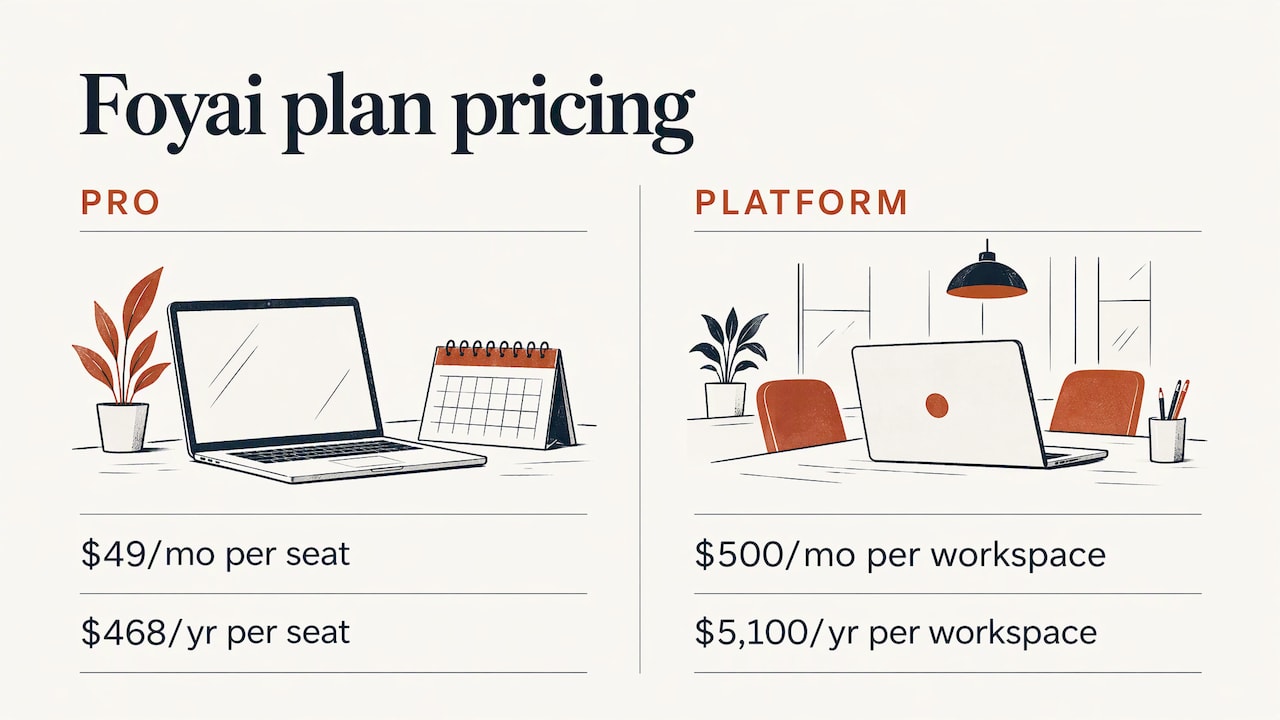
You can start on the Free plan. Pro is $49 per month per seat, or $468 per year per seat. Platform is a workspace-level plan at $500 per month, or $5,100 per year, per workspace. These prices were read from our pricing page in October 2026. To see what a finished room looks like, open a real Foyai room example.
A practical rollout for an Attio team
Here is an order of work that gets value without a big project.
Step 1: Fix the inputs
Sync email and calendar for every rep. Turn on call recording where your plan includes it. Attio’s docs make clear that Ask Attio only reads what is connected, so this step decides the quality of everything after it. Our guide to Attio CRM integrations and content updates shows how the connected tools fit together.
Step 2: Choose one or two agent jobs
Start with the pre-call brief and the post-call update. Both are low risk because a rep reviews the output, and both are used every day. Resist building ten workflows in the first week. Each AI block consumes credits, so a narrow start also keeps usage easy to read.
Step 3: Put approvals where the money is
Gate discounts, legal terms and anything that leaves the building. Because agents inherit a member’s permissions, assign them to a member whose access matches the job and nothing broader.
Step 4: Give the buyer one place
Once a deal reaches a live evaluation, create a room from the Attio deal. The call content you already captured becomes the draft. The rep reviews, adjusts and publishes it, and the room is the single link that goes to the buyer and their colleagues. For a deeper look at the automation side, see our guides to sales content automation and the personalized decks that sit inside a room.
Step 5: Read the engagement back in Attio
When buyer engagement lands on the deal record, your team can see who opened the room and what they looked at without leaving the CRM. That feeds directly into the next call and the next agent run.
Step 6: Review monthly
Look at credit use, which workflows reps actually trust, and which rooms drew engagement. Retire what nobody opens and extend what works.
Perspective
Most teams adopt Attio AI to make the seller faster, and it does. The overlooked half is the buyer. Every hour your team saves on research and notes is wasted if the buyer still receives a pile of attachments and has to work out what matters.
We built Foyai for Attio teams because the best data on a deal already lives in Attio: the calls, the notes, the stage, the contacts. A room that starts from that data does not ask your reps to write a second set of documents. It drafts the page, asks the seller for an update after each interaction, and keeps the buyer looking at something current.
Our view is that AI in the CRM and a sales room belong together. The first one organizes what you know. The second one presents it, and reports back what the buyer actually engaged with. When both sit on the same Attio record, the loop is closed, and the next conversation starts from evidence rather than guesswork.
Adam
FAQ
Is Attio AI free?
Partly. Ask Attio, self-building from email and calendar, and automatic enrichment are included on Attio’s Free plan. Call recording and Call Intelligence need a Pro plan, and all AI use draws on monthly credits.
Can Attio AI send emails or change records on its own?
Not without you. Suggested record changes in Ask Attio require approval, and email drafts must be reviewed and sent manually, per Attio’s documentation. Agents also run only with the permissions of the member they are assigned to.
What data does Attio AI use?
It works from your CRM records, notes, synced email and calendar, call recordings and transcripts, and connected tools. Email and calendar must be synced before it can reach emails and meetings.
Do I need a sales room if I already use Attio AI?
Attio AI helps your team prepare, follow up and update records. A sales room is what the buyer sees: one page with the proposal, recordings, plan and next steps. Foyai drafts that page from your Attio deal and sends engagement back to the record, so the two work as one system. You can begin on the Free plan.
How does Foyai work with Attio?
Foyai is built to work inside Attio. Rooms are created from Attio deals, drafted from call content and your content library, and buyer engagement syncs back to the pipeline record. The product overview shows the flow.
Sources
- Chat with Ask Attio, Attio Help
- Introducing Ask Attio
- Agents and automations, Attio
- Embedded intelligence, Attio
- Attio Workflows: revenue agents at your team’s command
- Custom agents reference, Attio
- Create a workflow, Attio Help
- Manage workspace and seat credits, Attio Help
- Go to market, supercharged by AI, Attio
- Attio MCP, Attio Docs