Find late-stage deals with no recent room visits.
You'll end up with two saved Attio views: late-stage deals where nobody on the buyer's side has opened the foyai room in 14 days (or ever), and active deals that still have no published room. Both take about ten minutes to build with standard filters, and together they show which deals need a follow-up.
Updated
One view for each way a deal goes quiet.
A deal goes quiet in two ways: the buyer stops opening the room, or there was never a room to open. Each view finds one of them.
Build both views in six steps.
Decide what "late" means
Pick the stages where a buyer who stops opening the room is a concern, for example Proposal and Negotiation. Everything before that goes in "active" for the second view.
Create "Late stage, gone quiet"
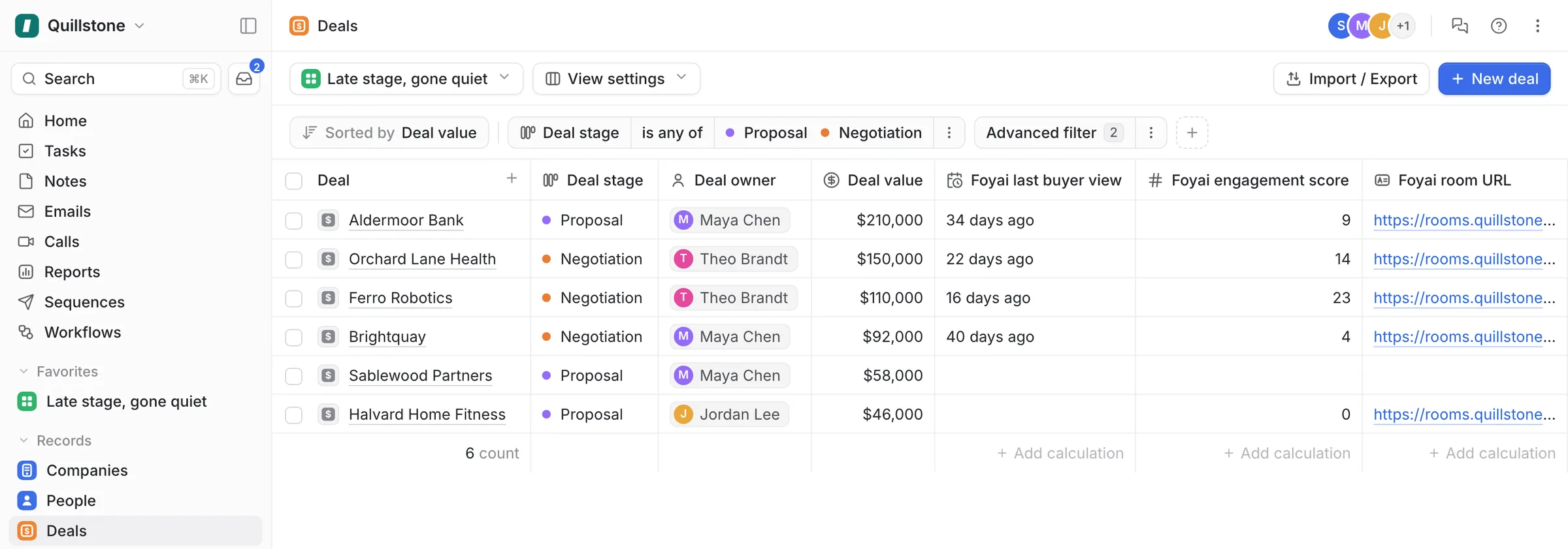
In Attio, open Deals and create a new table view. Filter Stage to your late stages.
Add the no-recent-visit condition
Add a filter group that matches either condition: Foyai last buyer view is before 14 days ago, or Foyai last buyer view is empty. The empty case catches rooms the buyer never opened, and deals with no room at all.
Sort by deal value
Sort by Value, highest first, and add the Foyai columns from the card above. Start with the largest deal on the list.
Create "Active, no room"
New Deals view. Filter Stage to your active stages and Foyai room URL to empty. The room URL only fills in once a room is published, so this also shows deals whose room is still sitting in draft.
Save both and put them on the agenda
Save the views and open them at the same point in every pipeline review.
Use the first view as a call list.
A deal can look fine in the CRM after a good call. The last buyer view shows whether anyone on the buyer's side has opened the room since. At the proposal stage, two weeks with no visits is a reason to call the buyer this week.
For each deal on the first list, ask one question: who on the buyer's side are we still in contact with? If the answer is nobody, re-engage with something new to open, like an updated plan or a recap of the last call, rather than another "just checking in".
The second list shows active deals where the buyer has no room to forward internally. Room automation drafts a room for each new deal that reaches a stage you choose.
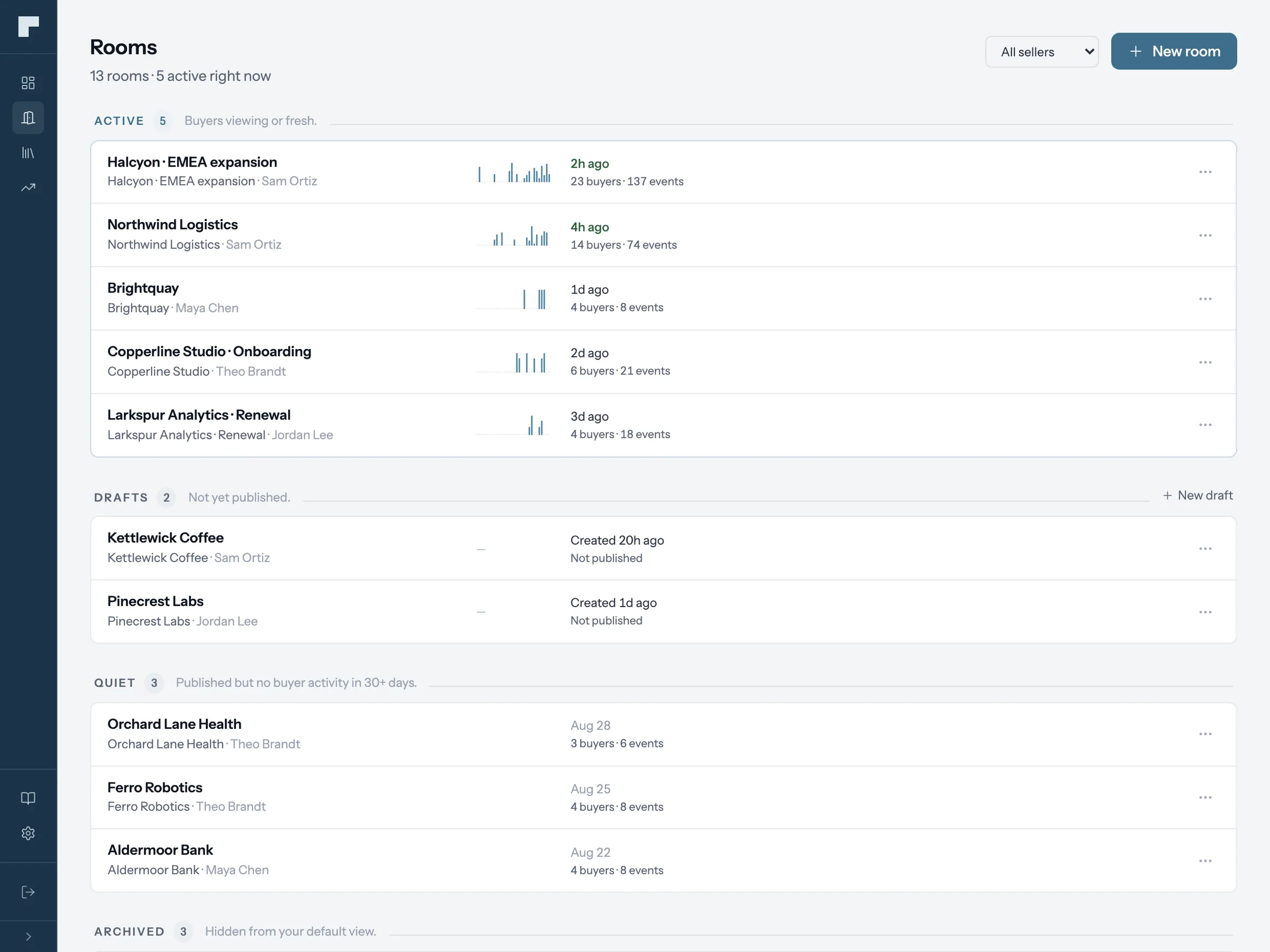
The Quiet lane lists rooms with no buyer visits in 30 days.
The rooms board in foyai sorts every room into four lanes: Active, Draft, Quiet and Archived. A room moves to Quiet when it's published but has had no buyer activity in 30 days, so you can find long-quiet rooms without building a view.
The foyai dashboard adds two more checks: rooms needing attention (published, no buyer view in 30 days) and Attio deals that still have no room. Use the Attio views for the weekly meeting and the Quiet lane for a monthly clean-up: unpublish or archive rooms for deals that are no longer active.
Get a Slack message when a buyer opens a room.
The Attio views are for your weekly review. Slack sends each rep a direct message about activity in their own rooms only, including rooms on the quiet list.
Connect Slack once for the whole team; each rep picks their own alerts.
- First buyer view. The first time each person opens a room. If a deal on your quiet list shows up here, a new person on the buyer's side has opened its room.
- Plan step completed. When a buyer ticks off a step in the action plan, with who did it and which step.
- Deal moved to Lost. When the Attio deal moves to Lost, the rep gets a prompt to unpublish or archive the room, so a lost deal's room doesn't stay published by mistake.
See which deals have no recent buyer visits before your next pipeline review.
Start free with Attio