Draft a room automatically when a deal reaches a stage you choose.
You'll end up with foyai drafting a buyer room when an Attio deal reaches a stage you choose, built from that stage's template and the deal's call recordings. Setup takes about ten minutes in foyai under Settings → Room automation, and nothing reaches a buyer until a rep reviews and publishes it.
Updated
- Created in that stage, or moved into it
- No one has to start it by hand
- From the template you mapped to that stage
- Drafted from the deal's call recordings
- Suggested plan steps waiting for review
- Edits anything, approves suggestions
- Publishes and sends the link
Map your stages once.
Save a template for each stage that needs a room
Build a room that suits the moment, such as a discovery recap for early stages or a proposal room for late ones, and save it as a template. Or start from the built-in Starter template.
Open Settings → Room automation
In foyai. Your Attio deal stages load automatically from the connection.
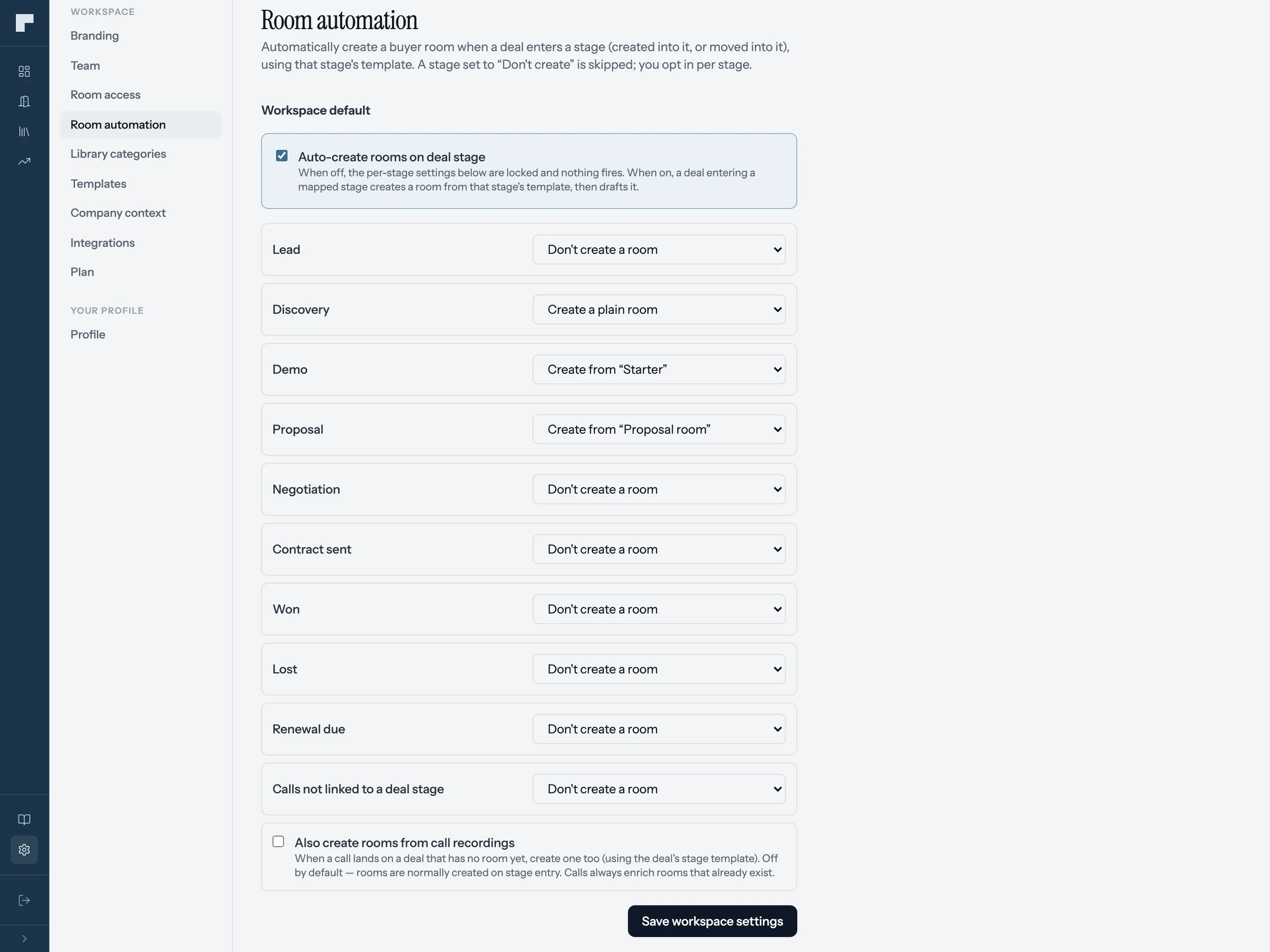
Turn on "Auto-create rooms on deal stage"
The master switch. While it's off, nothing is created.
Choose what each stage gets
Every stage starts at "Don't create a room". Change the ones you care about to "Create a plain room" or "Create from a template".
Optional: rooms from new calls
Turn on "Also create rooms from call recordings" to create a room when a recent call (under 48 hours old) is added to a deal that doesn't have one yet.
Test it with one deal
Move a test deal into a mapped stage in Attio. The drafted room shows up on your foyai dashboard like any other draft.
foyai creates at most one automatic room per deal, so a deal moving from Demo to Proposal keeps the room it already has.
Reps get the mapped template when they create a room in Attio.
With the foyai app installed from Attio's app store, reps can click Create Foyai Room on any deal or company. The template picker comes preselected with the template you mapped to that deal's stage, so most of the time the rep just confirms.
That works even while the automation switch is off. It's a good way to start: let reps create rooms by hand from Attio with the right template for a week or two, then switch on full automation once the templates feel right.
Automatic rooms are drafts that a rep reviews and publishes.
Building a room by hand takes a rep's time, so it often happens only on the largest deals. With automation, foyai drafts a room for each deal that reaches a mapped stage, and the rep decides what gets published.
Create rooms for deals already in a mapped stage.
Automation fires when a deal enters a stage, so deals already sitting there won't get a room on their own. Catch them up from Attio:
Filter a Deals view
Stage is the stage you just mapped, and Foyai room URL is empty.
Select the deals
Tick the rows you want rooms for, or all of them.
Run "Create Foyai Rooms"
Each selected deal without a room gets one, using its stage's template, drafted from its own calls.