Analytics
Every buyer view, click, download, and completed task is tracked, so you know which deals are alive before the buyer tells you.
Where to find it: Analytics in the main navigation (workspace-wide), or a room's Analytics tab (per room). Admins see all rooms; AEs see their own.
What gets counted
| Event | Meaning |
|---|---|
| Room views | A buyer opened the room |
| Section views | Which sections they read |
| Content clicks | Which specific asset or link they opened, not just that something was clicked |
| PDF downloads | Files they took with them |
| Video plays | Videos they started |
| Slide views | Per-slide views inside deck PDFs |
| Form submits | Forms they filled |
| Plan tasks completed | Action-plan steps they checked off |
Only genuine buyer activity counts. Your own team's visits are excluded (see below), and bare link clicks are excluded from engagement too, because email and chat apps "click" links to generate previews without a human opening anything.
Which embeds report video plays and form submits
Video plays and form submits come from the embedded player or form itself telling the room it fired, so only providers with a documented messaging API for it are covered today:
- Video plays: YouTube and Vimeo embeds. A play is counted once per video per room visit, and carries how long the buyer actually watched before pausing, finishing, or leaving the room.
- Form submits: Typeform embeds.
Other embedded providers (Loom, Wistia, Google Forms, and the rest of the embed library) don't report these two events yet. Everything else in the table above (room views, section views, content clicks, PDF downloads, slide views, plan tasks) keeps working the same for every embed.
Internal activity
A visit counts as internal when your own team opens a room through the buyer link: a logged-in preview, or a visit where a workspace member proved their own address at the email gate by clicking the magic link. That call is made once, when the visit is recorded, so every surface agrees: the Dashboard feed and KPI tiles, the Analytics page, per-room analytics, Slack first-view alerts, CRM engagement notes, and the engagement score all leave internal visits out. The Dashboard feed and the Analytics page have a Show internal activity toggle that brings them back on demand; internal rows in the feed carry an Internal tag. The KPI tiles, per-room analytics, and everything downstream always stay buyer-only. A teammate who signs in through the magic link is also never added to the room's stakeholders or created as a person in your CRM.
Some visits still count as buyer activity even when a teammate made them, because nothing proves who they were: anonymous visits, visits from an address that isn't on your workspace, and visits where the room only asks for an email domain (no magic link), since anyone can type a colleague's address there. On a custom domain your Foyai login isn't visible to the room, so a preview there is recognised as internal only if you pass the magic-link gate with your workspace address.
Workspace analytics
All buyer activity across your rooms: four headline stats (Total events, Room views, Unique visitors, Engaged rooms), an engagement-over-time chart for the last 30 days, the event breakdown, and Top rooms by engagement with deal value, visitor counts, a 30-day trend sparkline, and a recency badge. Each row links into that room's analytics.
By seller
Video
 Seeing your team's activityVideo · 1:22 · Click through
Workspace admins also get a By seller table: one row per seller showing their rooms, published rooms, engaged rooms, events, visitors, and a recency badge for their latest buyer activity. Sellers with zero rooms still appear, so you can see who hasn't started yet. Click a seller's name to open the rooms list filtered to their rooms. Rooms without an active owner (for example, a teammate who left) are grouped in an Unassigned row.
Room analytics
Per room, alongside deal value and stage from Attio:
- Headline stats: Room views, Unique visitors, Total events, and Action plan progress
- Visitors: each person who's been in the room, with how they authenticated, their views and clicks, and last seen. Buyers who passed an email gate appear by name and email; open-link visitors appear as anonymous (but are still tracked consistently across visits). Click a visitor for their full activity trail.
- Section engagement: views and clicks for each content section, so you can see not just that a buyer read a section but whether they clicked the asset or link in it, plus per-slide engagement (views, viewers, average dwell time) for slide decks
- Recent activity: the raw timeline
-
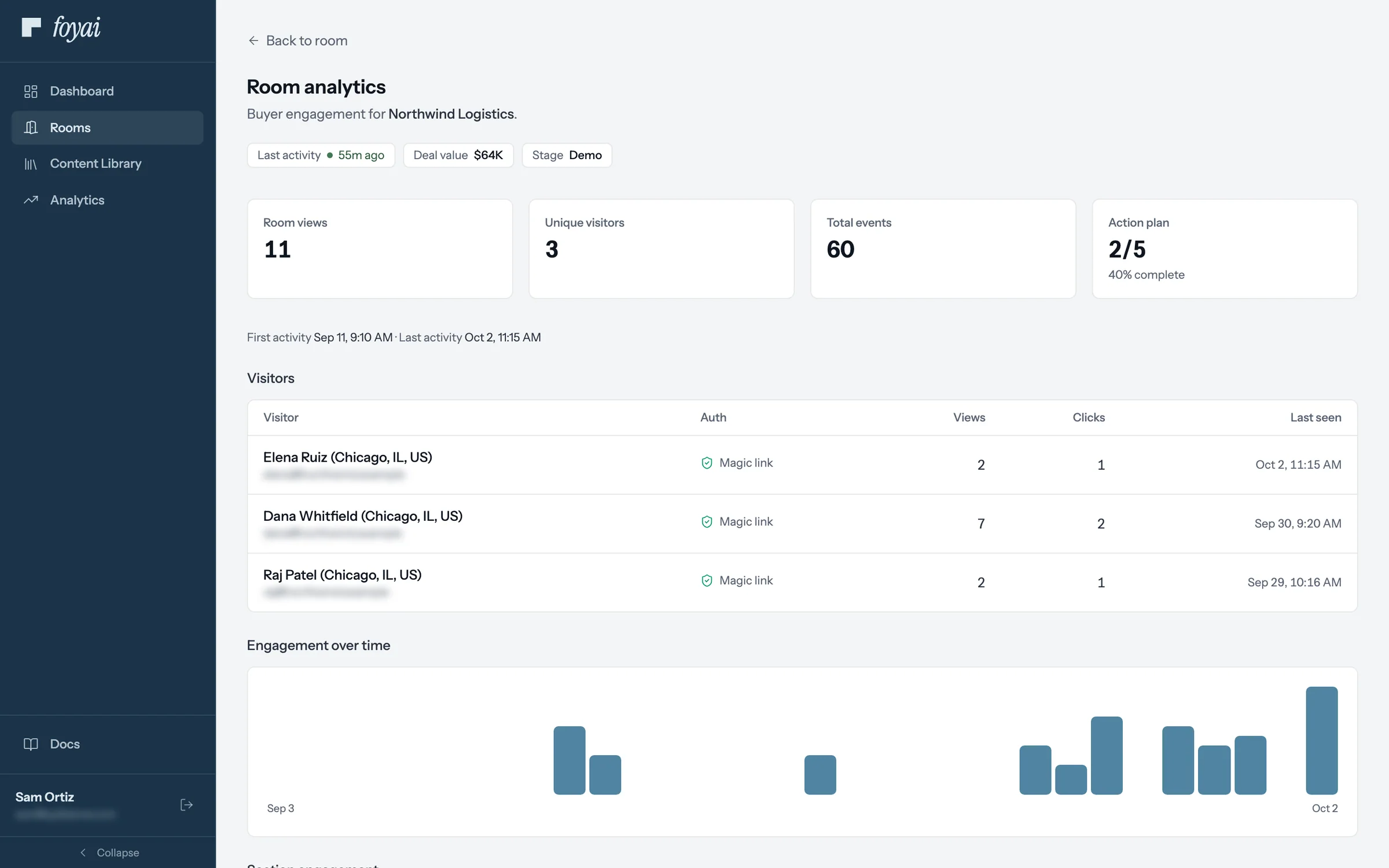
Step 1 of 7 Room analytics Sam opens the Northwind room's analytics: 11 room views from 3 visitors, and the plan at 2 of 5 steps.
-
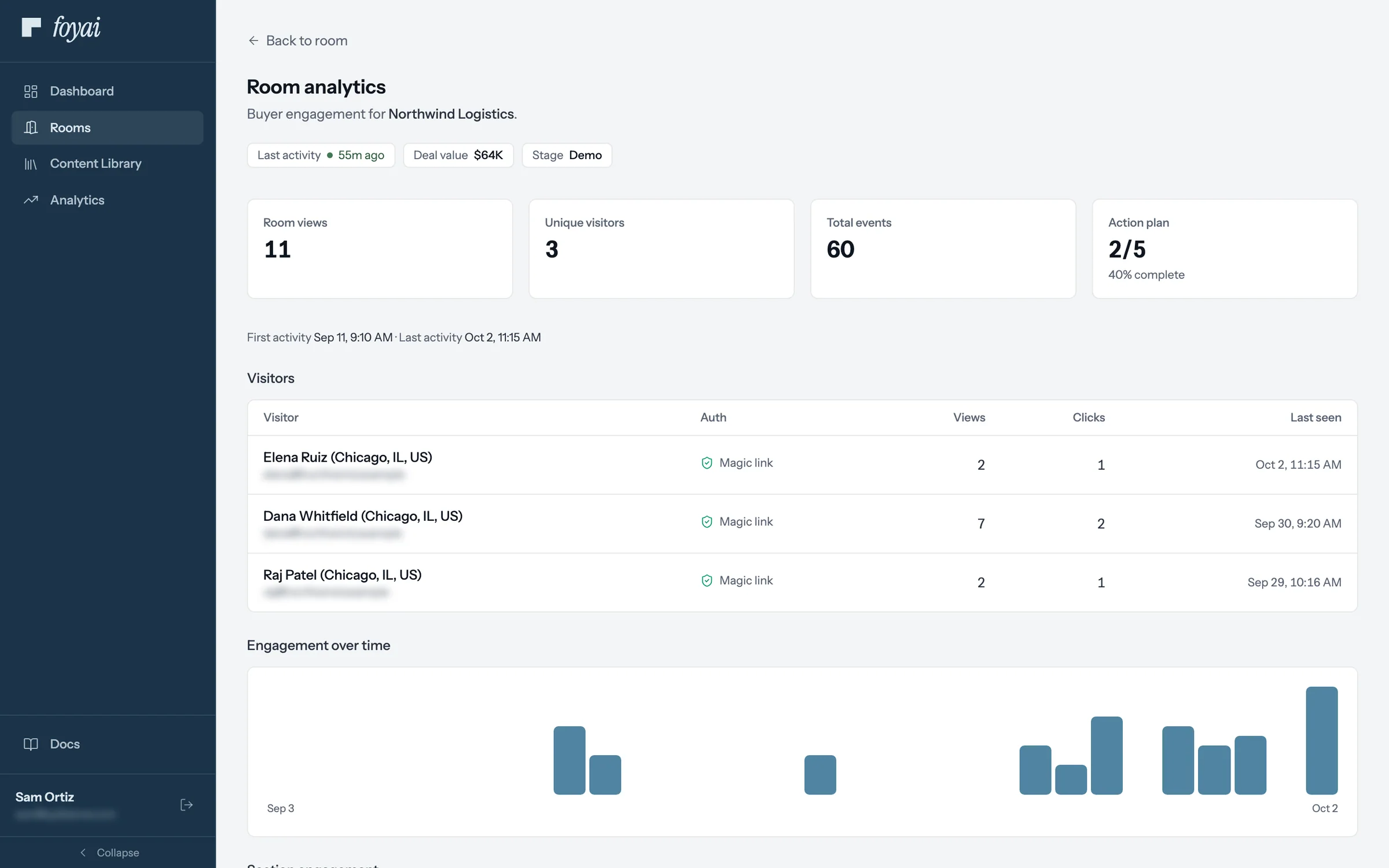
Step 2 of 7 Visitors by name Buyers who sign in with their email are listed by name, with their views, clicks, and when they were last there.
-
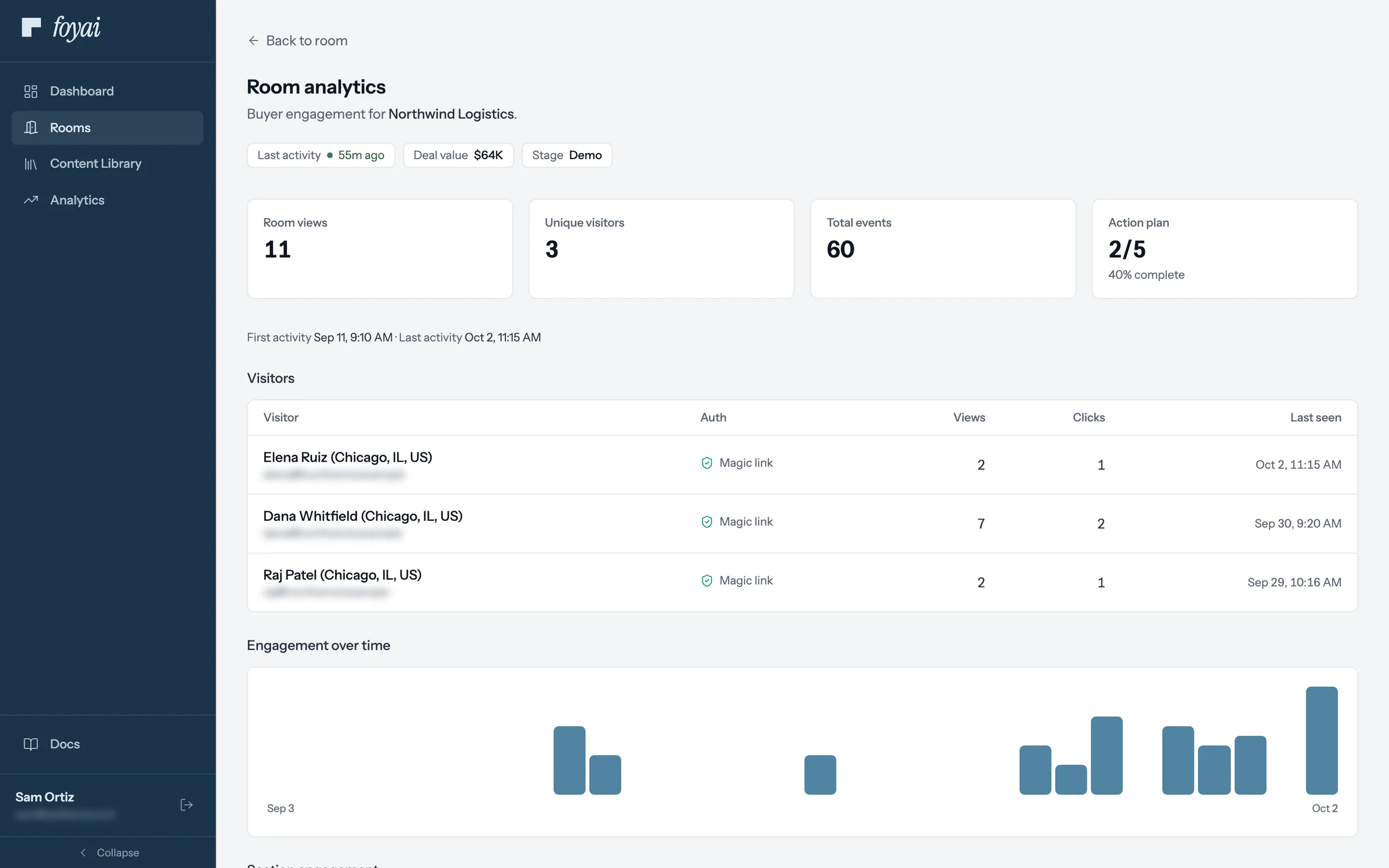
Step 3 of 7 A new name Elena Ruiz, Northwind's controller, opened the room for the first time this morning after Dana forwarded the link.
-
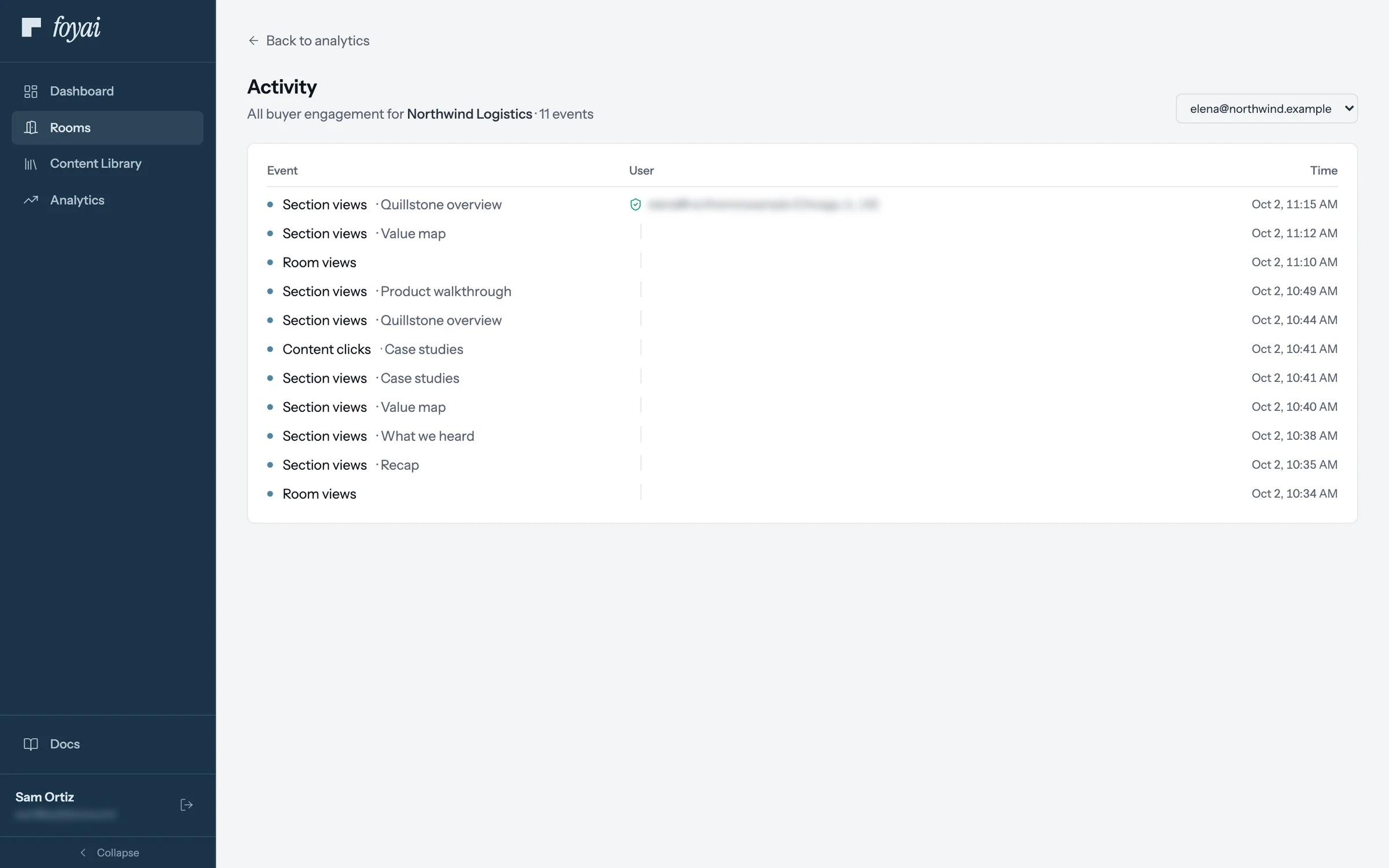
Step 4 of 7 What Elena looked at Click a visitor to see each section and link they opened, in order, with the time.
-
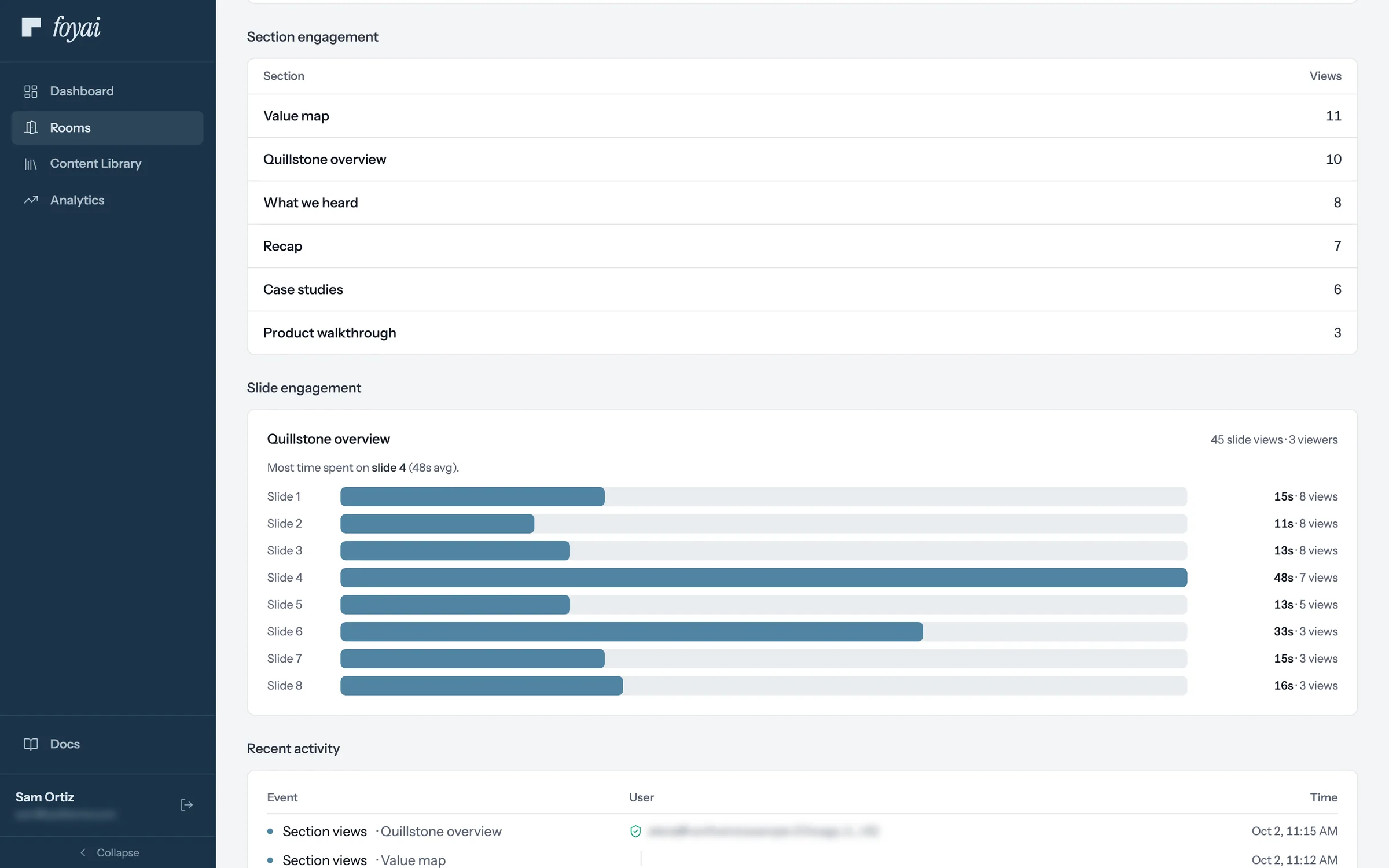
Step 5 of 7 Time on each slide For the deck, each slide shows its views and average time. Slide 4 held people longest, at 48 seconds.
-
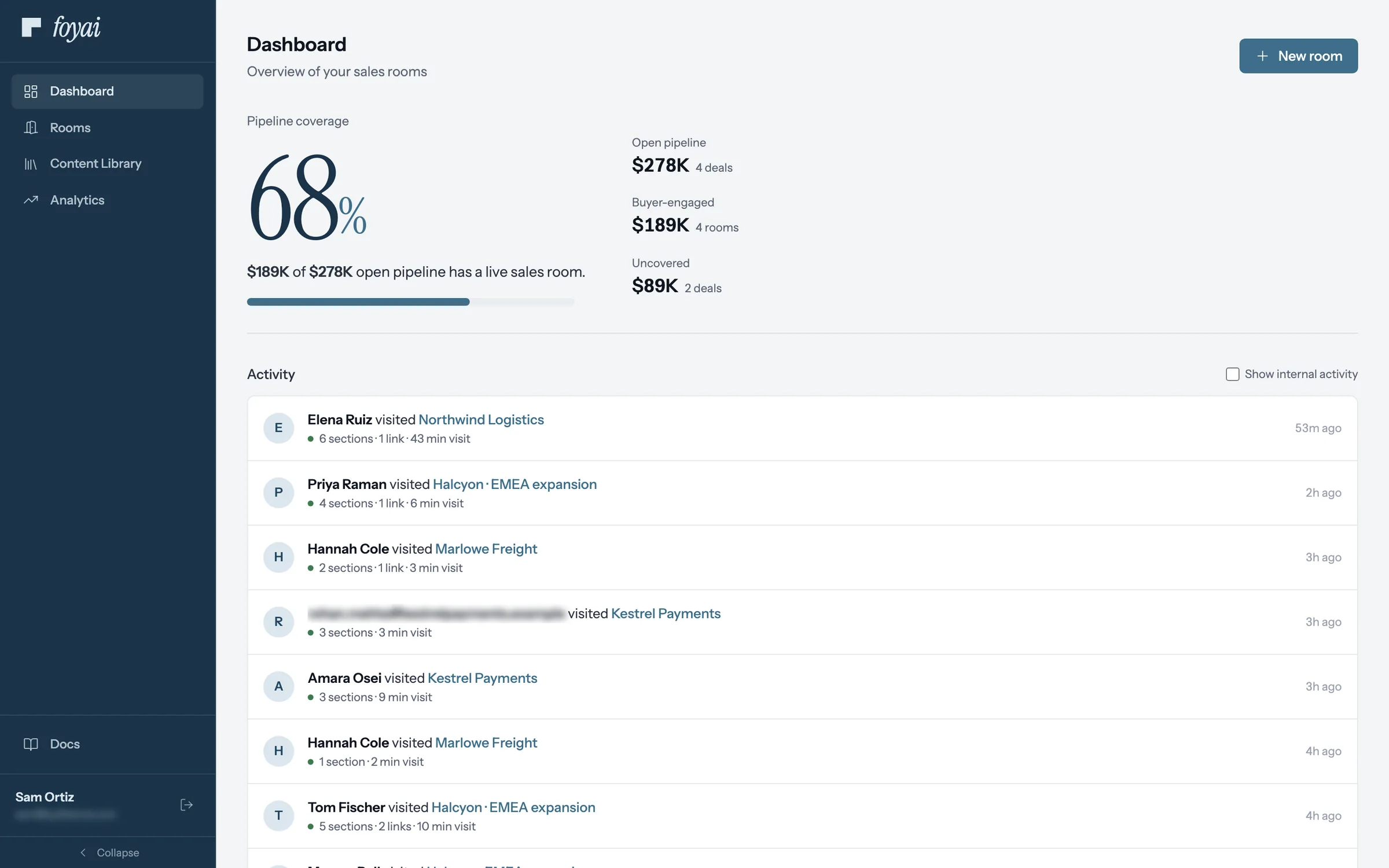
Step 6 of 7 Across all your rooms The Dashboard's activity feed lists visits to all of Sam's rooms: who came, what they opened, and for how long.
-
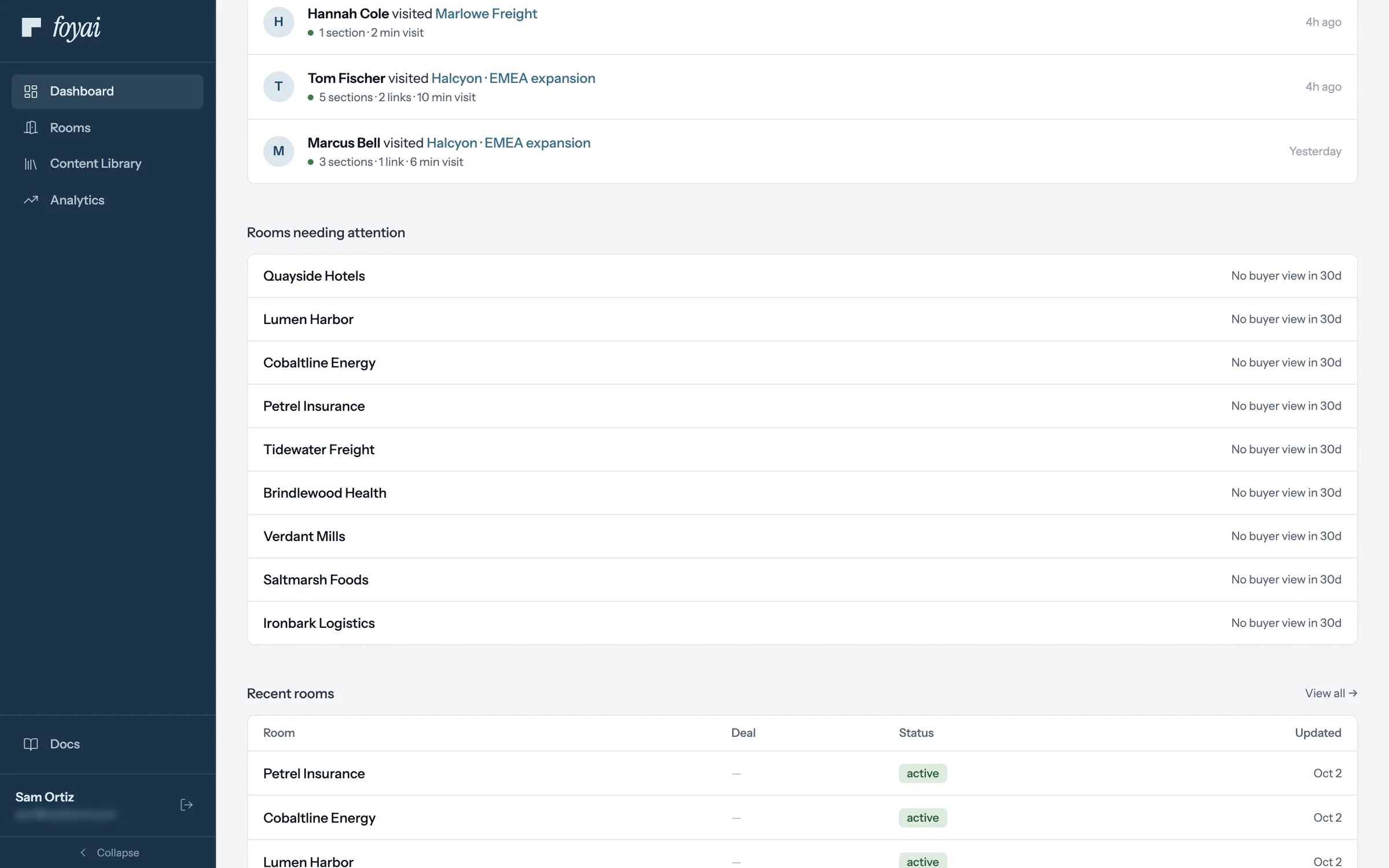
Step 7 of 7 Rooms needing attention Published rooms with no buyer view in 30 days are listed here, like Tidewater Freight.
See who opens each room, and what they look at.
Connect Attio and publish a room. Visitors who sign in with their email show up by name.
Reading the signals
- Visitor identity is a gating choice. If knowing exactly who viewed matters for a deal, use an email-verified access mode; "No gate" rooms produce anonymous visitors.
- Slide dwell time is the closest thing to reading the buyer's mind on a deck: it shows which slides held attention and where they stopped.
- New names in the Visitors table are often the real prize: stakeholders you didn't know existed, forwarded into the deal.
The Dashboard's activity feed shows recent visits across your rooms, one row per visit: who visited (by name or email once they pass an email gate, anonymous otherwise), which room, what they did, and how long they stayed. "Rooms needing attention" flags published rooms with no buyer view in 30 days.
Questions? Email support@foyai.com, or use the in-app chat.