See which deals had buyer activity this week.
You'll end up with a saved Attio view of every deal whose buyers opened their foyai room in the last seven days, sorted by engagement score so the most active deals sit at the top. It takes about five minutes with a standard Deals view: one filter, one sort and a few columns.
Updated
The view needs one filter, one sort, and a few columns.
The filter keeps only deals with buyer activity this week. The sort puts the deals with the highest engagement score first. The columns give you what you need to talk about each one without opening the record.
Everything here is a standard Attio view setting. If you've built a view before, you can build this one from the card on the right.
Five steps in Attio.
Start a new Deals view
In Attio, open Deals from the sidebar and create a new table view. Name it "Buyer activity this week" so the team knows what it's for.
Filter to this week's buyer activity
Add a filter on Foyai last buyer view and set it to the past 7 days. Pick the relative option rather than fixed dates, so next Monday's view shows next week's deals without you touching it.
Sort by engagement
Sort by Foyai engagement score, highest first. Deals where several people on the buyer's side viewed most of the room come first.
Show the columns you'll talk about
Next to Name, Stage, Owner and Value, add Foyai engagement score, Foyai last buyer view, Foyai active stakeholders and Foyai room URL. Hide anything you won't discuss in the meeting.
Save it, then copy it per rep
Save the view. If each rep wants their own, duplicate it and add an Owner filter, so each rep has their own list.
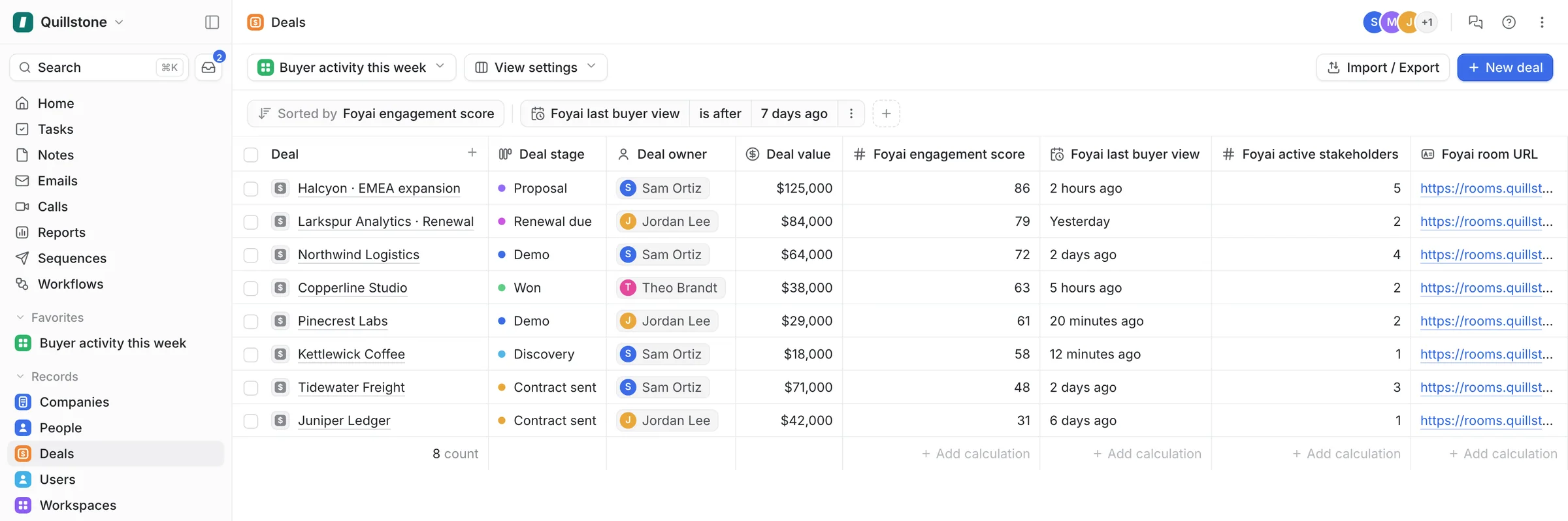
What you should see: this week's deals with buyer activity, highest engagement score first.
How the engagement score is calculated.
The Foyai engagement score runs from 0 to 100 and looks at the last 30 days of buyer activity in the room. Four factors add up to the total.
| Factor | Worth up to | What changes it |
|---|---|---|
| Recency of the last visit | 40 points | Highest when someone from the buyer's side was in the room recently; falls as the last visit gets older. |
| Distinct stakeholders | 30 points | How many different people from the buyer's side have engaged with the room. |
| Sections viewed | 20 points | How much of the room they viewed: the recap, the business case, the case studies, the decks. |
| Plan completion | 10 points | How far through the action plan the deal is. |
Visits from your own team are left out, so previewing a room doesn't raise a deal's score. The score updates about a minute after buyer activity.
Two deals, both visited yesterday. Say both deals had a buyer in the room yesterday. On the first, three people from the buyer's side have viewed most sections and ticked off two plan steps. On the second, one person opened the room and left. Both pass the filter; the first scores far higher.
How to use the view in your weekly pipeline review.
This view starts the review from what buyers did in their rooms: who opened them, how many people, and how much they viewed. Go through it before reps give their updates, so you can ask about specific activity on each deal.
Use it alongside the quiet-deals view, which lists late-stage deals with no recent visits.
- Start with the top five. These buyers were in the room this week. Ask the owner what changed and what the next step is.
- Look for new names. Open the latest Foyai room activity note on the deal and follow it to the room's analytics to see who visited and what they viewed.
- Notice who dropped off. A deal on last week's list that's missing today had no buyer visits in seven days. Follow up with the buyer before you change the deal's stage or forecast.
- Check the plan too. A high score means people on the buyer's side have opened and viewed the room. Check plan completion before you change a deal's forecast.
No Foyai fields on your deals yet? Connect Attio and publish your first room.
Start free with Attio