
Attio is a customer relationship management (CRM) platform for go-to-market teams. It tracks contacts, companies and deals, and it adds AI agents and automation on top of a flexible data model that you shape to your own sales process. It began in London and was founded by Nicolas Sharp and Alexander Christie. If your team already runs on Attio, the next gain is usually on the buyer’s side of the deal. foyai turns each Attio deal into a personalized digital sales room, so your buyers get everything in one place while your pipeline records stay current.
TL;DR
- Attio is a configurable, AI-native CRM. It suits teams that want to model their own data rather than bend a rigid accounts-contacts-opportunities structure.
- Plans run from a free tier to Ultra. AI and workflows draw on monthly credit pools, so look at credits as well as seat prices.
- Attio organizes what your team knows. It does not give the buyer a single, tailored place to review a proposal, call notes and next steps.
- foyai fills that gap natively inside Attio, with a free plan to start.
Table of Contents
- What Attio is and what the company does
- Who Attio is designed for
- How Attio organizes data and pipelines
- What Attio costs in 2026
- Strengths reviewers report
- The gap after the CRM: what the buyer sees
- How the room and the CRM work together
- Is Attio the right CRM for you?
- foyai pricing for Attio teams
- Our perspective
- FAQ
- Sources
What Attio is and what the company does
Attio describes itself as the platform for agentic revenue, organized around three ideas: Context, Orchestration and Ecosystem. In plain terms, it collects customer signals such as email, calendar and call data, keeps them attached to the right records, and lets automations and AI agents act on them. The co-founders built the data model from scratch so it could also serve as infrastructure for AI, rather than adding AI to an older design.
Its own launch positioning for Ask Attio, a conversational AI layer, rests on the bet that CRM should be rebuilt around the messy, unstructured reality of how go-to-market teams work. Attio’s site now cites more than 30,000 customers.
Who Attio is designed for
Attio is aimed at fast-growing technology businesses: venture-backed software, AI and product-led companies, plus VC and investment firms. Viewpoint Analysis lists support for company, people and deal records, email and calendar sync, automatic enrichment, call recording and analysis, lead-routing workflows, AI agents and outbound email sequences. Its strongest fit is with organizations whose data does not match a standard CRM structure, and with teams that want business operations, rather than outside consultants, to configure the system.
That profile is the reason Attio teams tend to be small, fast and opinionated about their process. They also tend to sell to buyers who expect a modern experience, which matters later in this article.
How Attio organizes data and pipelines
The model has three layers, and it helps to know them before you build anything.
- Objects are the types of thing you track: Companies and People on every plan, with Deals, Users, Workspaces and custom objects on higher plans.
- Records are the individual items inside an object, each with attributes such as owner, amount or stage.
- Lists group records into a process. A sales pipeline is a list, and list attributes live on the list entry, so one record can sit in several pipelines without being duplicated.
Pipelines show as kanban boards or tables. You can run separate ones for inbound, outbound, renewals or upsells. Notes and tasks attach to records, and Attio’s email and calendar sync logs interactions against the right people and companies without manual entry.
Workflows and credits
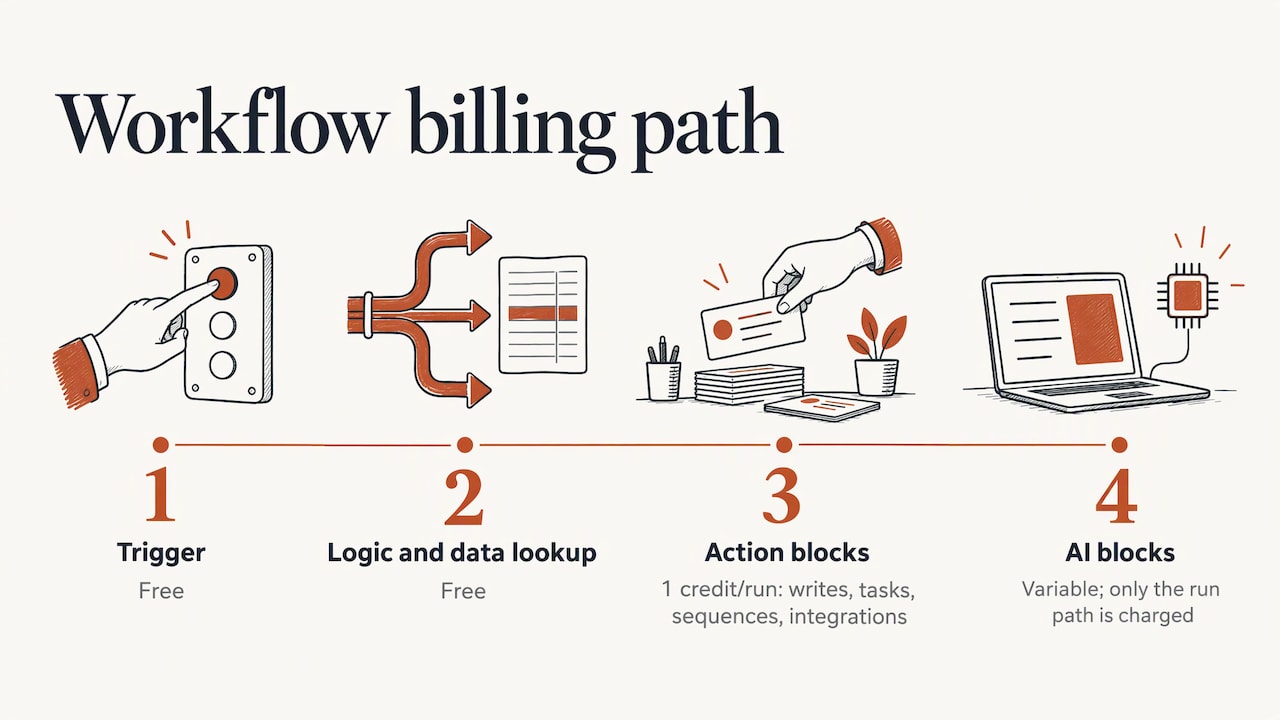
Automation comes from a visual, no-code workflow builder with triggers, conditions, record updates, notifications and AI blocks. Typical uses are auto-assigning leads, creating follow-up tasks after a stage change and posting to Slack.
The billing detail is worth understanding. In the newer builder, triggers, logic and data lookups are free, while record writes, tasks, sequence enrollment and integration blocks cost one credit per run. AI blocks vary. Only the path a run actually takes is charged.
Integrations and AI
Attio’s app store lists more than 400 integrations, including Gmail, Outlook, Zoom, Microsoft Teams, Slack, Stripe, Typeform, PandaDoc and Zapier. It also offers an API and an MCP connection for AI tools such as Claude and ChatGPT. Ask Attio can search, create and update records and trigger workflows through conversation. For a hands-on look at the AI features on live deals, see our guide to Attio AI.
What Attio costs in 2026
Plan details below are as published on Attio’s pricing page and summarized by SaaSCRMReview on November 17, 2026. Attio adjusts prices and limits from time to time, so confirm against its pricing page before you budget.
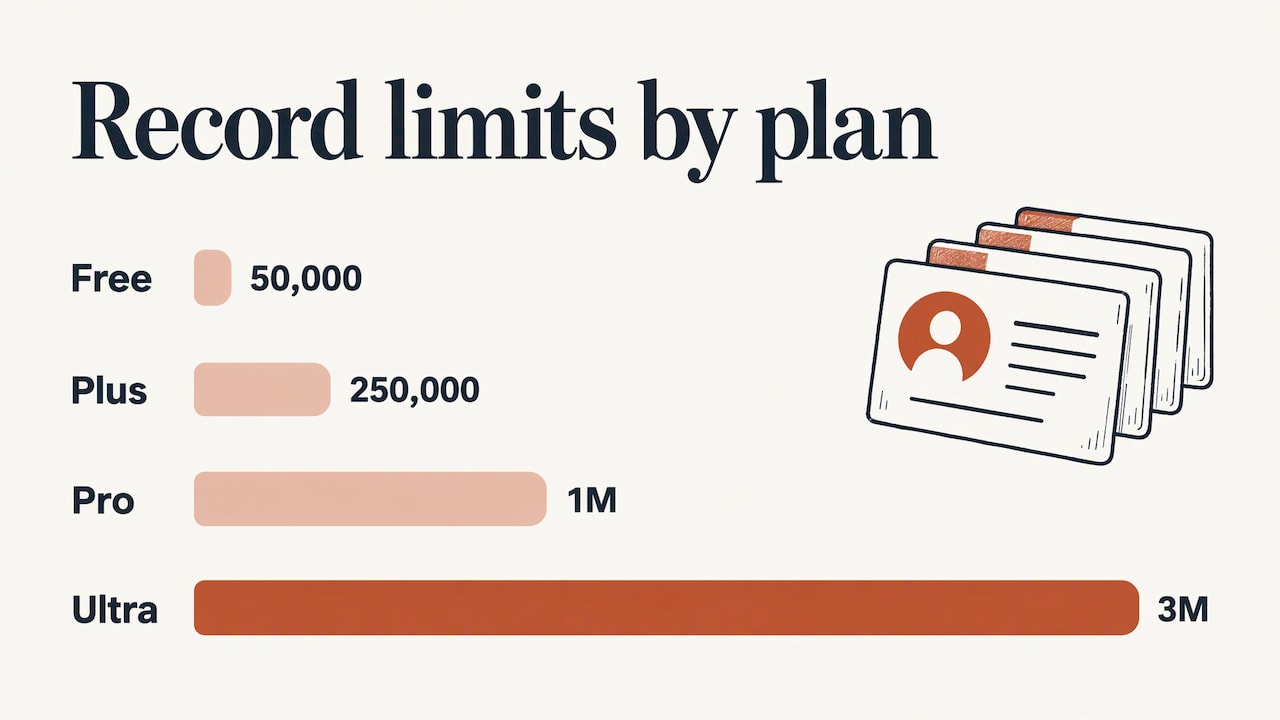
| Plan | Headline price | Seats | Records | Notable features |
|---|---|---|---|---|
| Free | $0 | Up to 3 | 50,000 | 3 objects, 3 reports, 200 email sends per user per month |
| Plus | $40/mo per workspace, with 1 user included | Up to 10 | 250,000 | 5 objects, basic permissions, funnel reports |
| Pro | $100/mo per workspace | Unlimited | 1M | Custom objects, sequences, Call Intelligence, 100 reports |
| Ultra | $1,000/mo with 5 users included | Unlimited | 3M | SSO, SCIM, audit logs, advanced controls |
Per-user fees are added on top of the workspace price: on annual billing, $35 per user on Plus, $79 on Pro and $189 on Ultra. AI features and workflows run on monthly credit pools, from 100 to 2,500 credits per seat and 250 to 20,000 per workspace depending on plan. Extra credit packs start at $70 a month for 5,000 credits on annual billing.
Two practical points follow. First, budget by seats and by expected automation volume, because heavy AI and workflow use draws on credits. Second, features such as call recording and sequences sit on Pro, so a team that wants the full sales cycle captured in Attio will generally land there.
Strengths reviewers report
Independent reviews agree on what Attio does well. Hack’celeration scores it 4.2 out of 5 and praises the flexible custom-object model, the fast Notion-like interface, built-in AI and its API and MCP extensibility. Stackyroo scored it 88 out of 100 on customization, automation and AI.
The same reviews note where teams invest effort: workflow and webhook setup has a learning curve, and the flexibility can feel like a lot at the start. Those are the usual costs of a CRM you configure yourself, and teams that have a RevOps owner handle them well.
The gap after the CRM: what the buyer sees
Attio is a system of record and a system of action for your team. Everything it knows is organized for the seller: calls logged, notes linked, stages moved, tasks created. The buyer sees none of it. What they get is a thread of emails, a proposal deck in one attachment, a recording link in another and a calendar invite for the next step.
On a long sales cycle that scatter is where engagement leaks. The buying committee changes, a new stakeholder joins and has to piece the story together from forwarded messages. Meanwhile your Attio record is accurate, but the buyer’s view of the deal is not.
A digital sales room closes that gap. It is a single shared page per deal that holds the proposal, the relevant content, the agreed next steps and the recordings the buyer needs. Our practical guide to digital sales rooms explains the format in more depth.
How the room and the CRM work together
The useful setup is one where the room and the CRM never drift apart. That is how foyai is built: it is a digital sales room made exclusively for Attio, so rooms are created from Attio deals and buyer engagement data syncs back to your pipeline records.
In practice, the routine for an Attio team looks like this:
- Create the room from the deal. foyai drafts a personalized deal page from your call recordings and your content library, so the seller starts from a draft instead of a blank page. Teams with many deals to open can create rooms in bulk.
- Review and publish. The seller reviews the draft before the buyer sees it, so nothing goes out unchecked.
- Keep it current. After every interaction, foyai prompts the seller for the update the room needs, so the page tracks the deal as it moves.
- Watch engagement. Buyer activity syncs back to Attio, which lets a seller see which late-stage deals have gone quiet. We keep a ready-made view for exactly that: late-stage deals with no recent buyer visits.
- Align on next steps. Mutual action plans sync with the room, so the buyer and the seller work from the same list.
The room connects to tools your team likely already uses, including Google Drive, Google Slides, Loom, YouTube, Vimeo, Slack, DocuSign, Typeform and Calendly. Access controls keep each room secure, and the buyer experience carries your branding. For the setup detail, see how to sync sales rooms with Attio and our overview of Attio CRM integrations.
Where it saves the most time
The biggest saving is in the work that follows a call. Our sales call follow-up playbook for Attio teams shows how a call recording becomes a buyer-ready summary and next steps. If your team produces decks and documents for each deal, sales content automation covers how to automate them alongside the rooms. For other patterns, browse the use cases for teams on Attio.
Is Attio the right CRM for you?
Attio fits best when:
- Your team is a software, AI or product-led business, or an investment firm, with a deal flow that does not match a standard template.
- You have someone in RevOps or sales operations who will own configuration.
- You want AI and automation in the same system as the records, rather than spread across separate tools.
Buyers who need complex quoting, field service or deep ERP integration should assess their requirements closely, as Viewpoint Analysis points out. If you are still choosing, run your real pipeline through the free plan first.
If you already use Attio, or have just chosen it, the buyer-facing layer is the next piece to add. foyai only works with Attio, which is why it can sit directly on your deals instead of beside them.
foyai pricing for Attio teams
Teams that run on Attio can start with foyai’s free plan at $0 and see a room built from a live deal. Paid plans are:
- Pro: $49 per month per seat, or $468 per year per seat, which unlocks personalized features and bulk capabilities.
- Platform: $500 per month per workspace, or $5,100 per year per workspace, billed at the workspace level by number of active rooms.
See the full details on the foyai pricing page, or look at a real foyai room before you decide.

Our perspective
Attio gives a sales team something rare: a CRM that bends to the way you sell. That flexibility is why its customers can run lean and still keep every call, email and task attached to the right deal.
But a well-organized CRM is organized for you. The buyer is still left to assemble the story from attachments and forwarded threads, often across a committee of people who joined at different times. We think the deal should have one page that is as well kept as the record behind it.
That is why we built foyai only for Attio. When the room is drafted from the deal, refreshed after every interaction and reporting engagement back to the pipeline, the seller’s record and the buyer’s view stay the same story. Teams that sell on Attio should not have to choose between a flexible CRM and a polished buyer experience.
Adam
FAQ
Is Attio a good CRM?
Independent reviewers rate it well, with Hack’celeration giving it 4.2 out of 5 for its flexible data model, interface and built-in AI. It suits technology companies and investment firms that want to configure their own process. Test it on the free plan with your own pipeline.
Who founded Attio?
Nicolas Sharp and Alexander Christie founded Attio, which started in London, according to GTM Unpacked. The company describes its platform as built for agentic revenue.
How much does Attio cost?
As of November 2026, SaaSCRMReview reports a free plan, Plus from $40 per month per workspace, Pro at $100 per month per workspace and Ultra at $1,000 per month, with per-user fees and credit pools for AI and workflows. Check Attio’s own pricing page for the current figures.
Can I add a digital sales room to Attio?
Yes. foyai is a digital sales room built for Attio. It creates rooms from your Attio deals and syncs buyer engagement back to your pipeline records. You can start on the free plan.
Sources
- What is Attio? Founders, products, pricing and key facts
- Who Are Attio? The AI-Native CRM Platform Explained
- What Is Attio CRM? Pricing, Data Model and First Setup
- Attio Workflows: Triggers, Blocks, Credits and the API
- Attio Review: Pricing & Limitations, WeekCRM
- Attio Pricing 2026: Plans, Credits & Real Cost per Seat
- Attio Review 2026: Real Pricing, Seat Limits, Pros and Cons
- Attio Review (2026): Pricing, Pros and Cons, Stackyroo